How an Online AI Video Generator Actually Works, Start to Finish
A real walkthrough of generating video online with AI: prompt to finished short in 2-5 min, what each step costs in credits, and an honest tool comparison.
Use Cases
TL;DR: An online AI video generator turns a sentence of text into a finished short-form video without you editing a single frame. With Keyvello the loop is: type a prompt, pick a template, wait 2 to 5 minutes, and watch the result render in the cloud. New accounts get 20 credits and no card. The catch worth knowing up front: you can generate and fully preview for free, but downloading the MP4 needs a paid plan. There is no watermark on any plan, so the preview is the genuine output, not a teaser.
This page is the workflow walkthrough, not a feature list. If you have never run a text-to-video tool and want to know exactly what happens between hitting "generate" and having a postable clip, that is what is below.
The generation loop in three steps
The whole job happens server-side. Your machine just shows the page, so a phone and a workstation get the same result at the same speed.
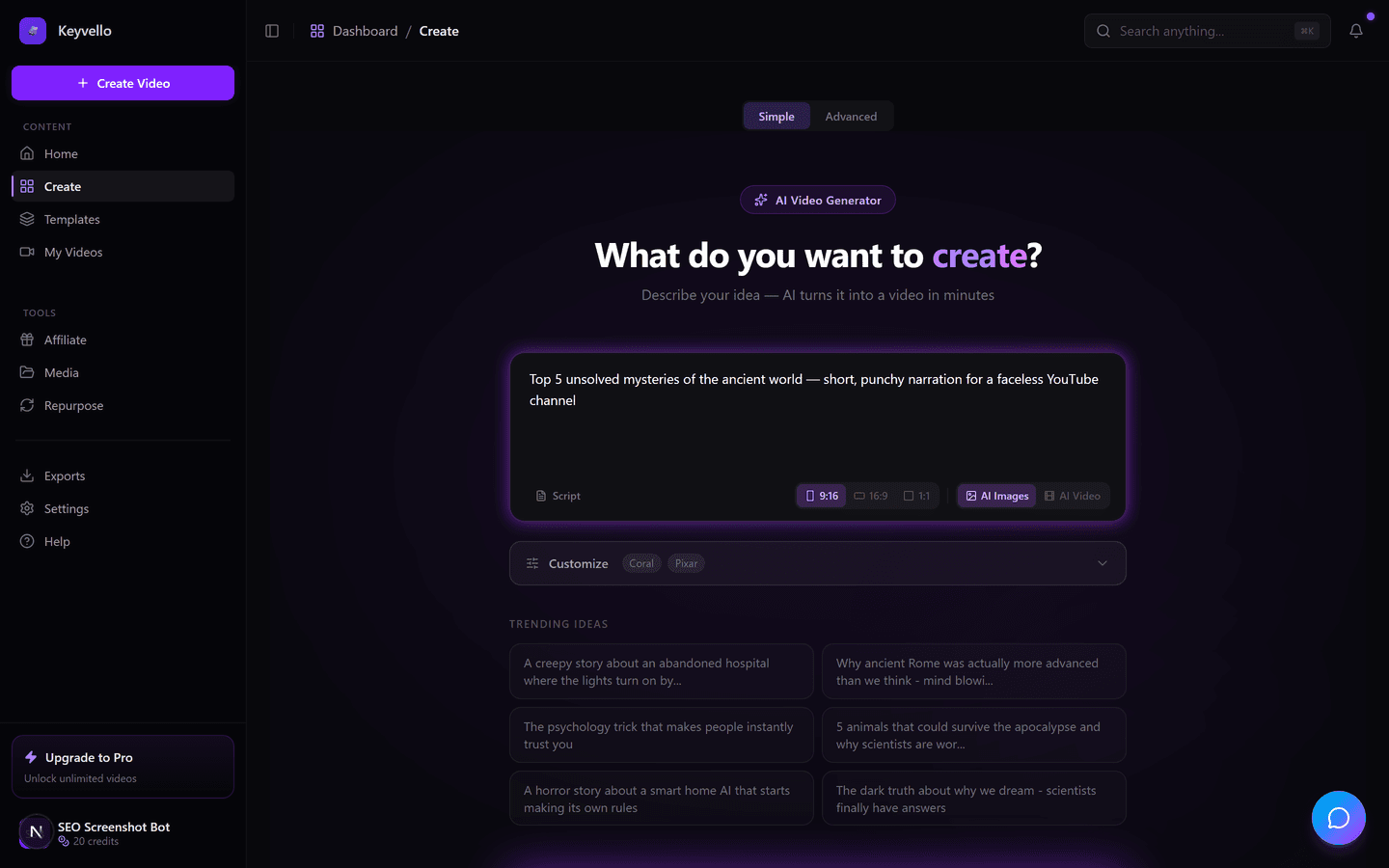
Step 1: Describe the video or paste a script
You give the generator an idea, like "5 unsettling facts about the Mariana Trench," or paste a script you already wrote. Behind the scenes the model writes the narration, splits it into scenes, then fans out two jobs in parallel: it generates an AI image for each scene and synthesizes the voiceover (via ElevenLabs) at the same time. This is why the wait is minutes, not the half hour a manual edit would take.
Step 2: Pick the template that matches your niche
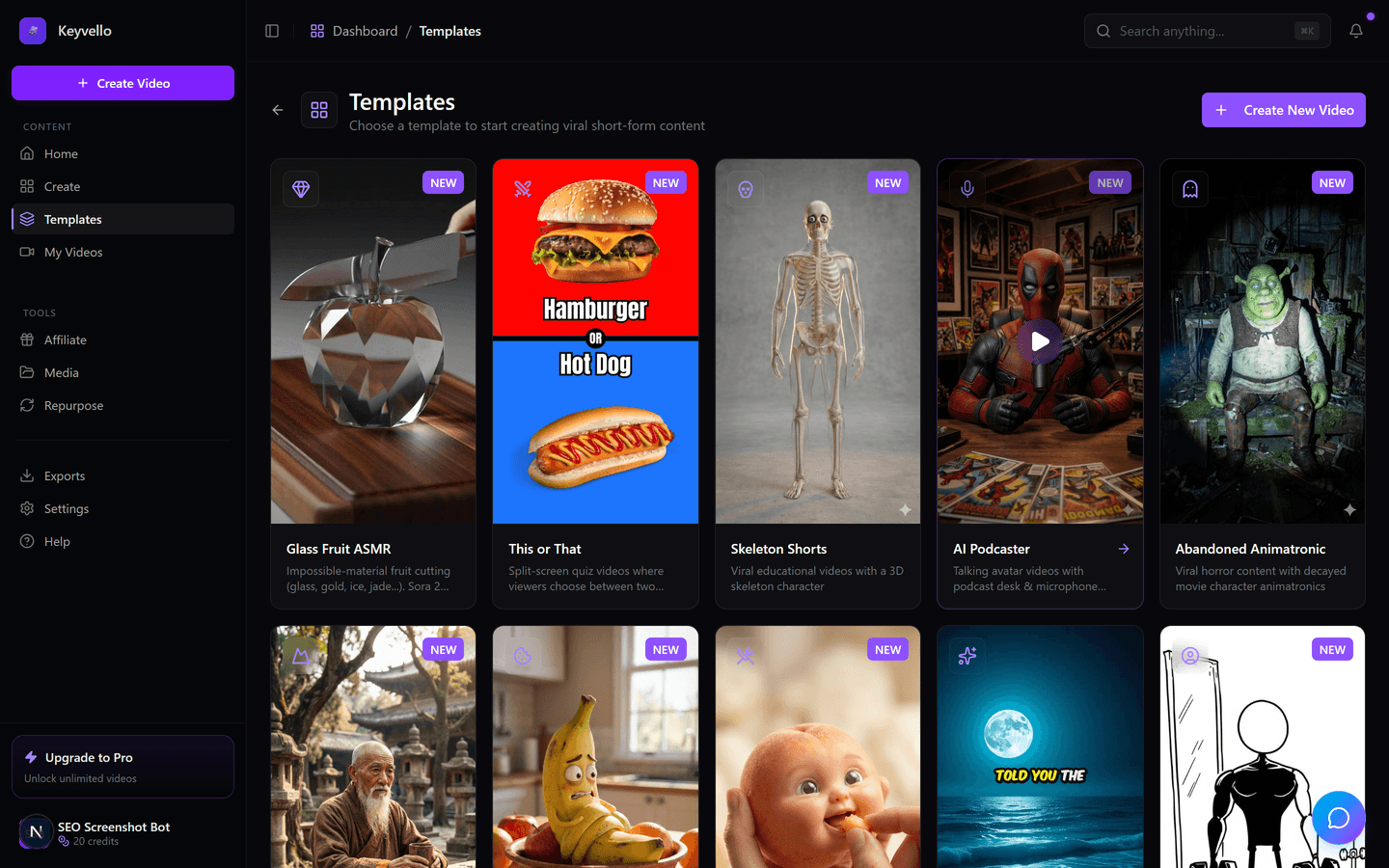
The template decides the visual style, pacing, and caption look, so there is no timeline to learn. There are 11 of them built for faceless content: AI Stories, Fake Texts, Stick Animation, Kids Stories, Split Screen, Viral Wisdom, and more. Choosing the right one up front matters more than any later tweak, because it sets how the images and captions are framed.
Step 3: Generate, then review and patch in place
Rendering runs on our infrastructure and takes roughly 2 to 5 minutes depending on length and quality tier. When it finishes, the full 9:16 video, AI images plus narration plus burned-in captions, plays in the same tab. You rarely accept the first pass blindly: if one image is off, you regenerate just that frame for 1 credit; if the voice read is flat, you redo the voiceover for 3. You are patching, not re-rendering the whole thing.
See a real output before you spend a credit
Reading about output quality is useless, so here is an actual Keyvello-generated clip. Treat it as an honest example of what the AI produces, not as this exact niche and not a hand-polished one-off. Watch it on a phone with sound on, the way your audience will scroll past it.
What to actually expect: time, quality, and where it stumbles
Setting expectations honestly, because that is the part most generators gloss over.
- Time: 2 to 5 minutes per short is the norm. A 30-second clip lands near the fast end; a 5 to 10 minute long-form piece sits at the slow end. The job runs in the cloud, so you can start it and close the tab; it finishes regardless.
- Quality: images come from a current diffusion model and the voice from ElevenLabs, so the ceiling is high. But AI image generation is still inconsistent across a batch, one scene in eight might miss. That is exactly why the per-frame regenerate exists at 1 credit, instead of forcing a full re-run.
- Where it stumbles: precise on-screen text inside an image, brand logos, or a specific real person's face are weak spots for any text-to-image model today. Plan to swap that one scene rather than fight the prompt.
- The download gate: generation and preview are free; exporting the file is the paid step. We say this plainly because the common alternative, a free but watermarked low-res export, wastes a render you cannot post.
What each step costs, in real credits
Keyvello bills in credits, and the cost scales with length, captions, and quality tier rather than a flat per-video fee. The average video our creators make is about 36 seconds and costs roughly 15 credits. Base-quality pricing:
| Video length | Base credits | + Captions |
|---|---|---|
| 30 seconds | 10 | 12 |
| 60 seconds | 18 | 20 |
| 90 seconds | 25 | 27 |
| 3 minutes | 40 | 42 |
| 5 minutes | 70 | 72 |
| 10 minutes | 120 | 122 |
Quality multipliers stack on top: base is 1x, pro is 1.5x, ultra is 2.5x. A 30-second base short is 10 credits; the same clip at ultra is 25. One thing to flag loudly: full AI video generation (actual animated footage instead of AI images plus narration) is far more expensive, around 60 credits for 30 seconds and 108 for 60. Mid-workflow fixes are cheap by design, a single image regenerate is 1 credit and a voice redo is 3. With 20 free signup credits you can generate and preview roughly two 30-second image-based shorts, enough to judge the output before paying.
How the workflow compares to other online generators
If you are choosing where to run this loop, the things that actually differ are how much you can do before paying, whether the output is clean, and what kind of video you get. Facts below were checked against each company's public materials in May 2026; where a detail is unclear, the cell says "check site" instead of guessing.
| Tool | Generate + preview free? | Free export | Watermark on paid output | Cheapest paid | Output style |
|---|---|---|---|---|---|
| Keyvello | Yes, full quality, no card | No, download needs a paid plan | None on any plan | $19/mo | Faceless shorts, 11 templates |
| InVideo AI | Yes, limited AI minutes | Yes, but watermarked, ~4 exports (source) | Removed on paid | check site | Stock-footage marketing videos |
| Fliki | Yes, ~5 min/mo | Yes, 720p + watermark (source) | Removed on paid | ~$21/mo (annual) | Text-to-video with AI voices |
| Pictory | Trial: 3 projects (source) | Trial-only, watermarked | Removed on paid | $19/mo | Script and article to video |
| Runway | Yes, limited free credits | check site | check site | check site | Generative film-style clips |
The pattern across the field: most generators let you export for free, but only with a watermark, and the free tiers cap out at a few minutes or projects. Keyvello takes the opposite trade, no free export at all, but the instant you pay, every video on every plan is clean output with nothing to strip.
When a different tool fits the job better
This workflow is tuned for one thing, fast faceless shorts, and it is not the right call everywhere. If you want generative, film-style or VFX-heavy shots rather than narrated images, Runway leads that space. If you need a realistic talking-avatar presenter for training, sales, or localized enterprise video, Synthesia or HeyGen do that far better. If your raw material is long blog articles you want chopped into stock-footage marketing clips, Pictory or InVideo are purpose-built for that. And if you genuinely just need a free watermarked export today and the watermark does not bother you, Fliki or InVideo will hand you one. Reach for Keyvello when the goal is narrative short-form for TikTok, Shorts, and Reels, generated fast and in volume.
This is a workflow people run daily, not a demo
Creators have generated more than 9,000 videos on Keyvello, including over 2,400 in the last 30 days, across a community of 6,000+ creators. That last-30-days number is the one that matters, it is the same loop described above being run again and again by people actually shipping content.
Run the whole loop free
Make an account, take your 20 credits, type a prompt, pick a template, and watch a real short render in a few minutes, all without a card and all without a watermark on the result. If the output earns it, the cheapest paid plan is $19/mo and lifts the download lock so you can actually post what you made.
Frequently Asked Questions
How long does it take to generate one video online?
Usually 2 to 5 minutes from prompt to finished preview. A 30-second short lands near the fast end; a 5 to 10 minute long-form video sits at the slow end because there are more scenes and more audio to synthesize. The job runs on our servers, so you can start it and close the tab, it keeps rendering and is ready when you return.
What exactly happens after I type a prompt?
The AI writes the narration, splits it into scenes, then generates an image for each scene and synthesizes the ElevenLabs voiceover in parallel. Those pieces are composited into a vertical video with burned-in captions, which plays back in the same browser tab. You never touch a timeline.
How many credits does the whole workflow use?
It depends on length, captions, and quality tier. A base-quality 30-second short is 10 credits (12 with captions); 60 seconds is 18; 90 seconds is 25. Quality multipliers stack on top (pro 1.5x, ultra 2.5x). The average video our creators make is about 36 seconds and roughly 15 credits. Mid-workflow fixes are cheap: an image regenerate is 1 credit, a voice redo is 3.
Can I fix parts of the video instead of regenerating the whole thing?
Yes, and that is the normal way to use it. If one scene's image is off, you regenerate just that frame for 1 credit. If the narration read is flat, you redo the voiceover for 3 credits. You are patching individual pieces, not paying to re-render the entire video.
Is the output quality actually good, or is it AI-slop?
Images come from a current diffusion model and the voice from ElevenLabs, so the ceiling is high, the sample video on this page is a real, untouched output. The honest caveat is that AI image generation is inconsistent across a batch, so one scene in eight might miss. That is why the cheap per-frame regenerate exists, and why on-screen text, logos, and specific real faces are best handled by swapping that one scene.
Do I need to pay or add a card to try the full workflow?
No. New accounts get 20 credits with no credit card, enough to generate and fully preview roughly two 30-second shorts at full quality. The only paid step is downloading the finished MP4, which starts at $19/mo. There is no watermark on any plan, so the free preview is the genuine output.
Start Creating Create Stunning Videos with Keyvello's AI Video Generator Videos
AI-generated create stunning videos with keyvello's ai video generator videos in minutes. Try it free.
Get Started Free