Step-by-Step Guide Maker: Turn a Process Into a Narrated How-To Video
Turn any process into a clear, narrated step-by-step video. Write your steps, pick a voice, and Keyvello builds the explainer. Free preview, no card needed.
Use Cases
TL;DR
If you already know the steps to a task and want a clean, narrated step-by-step video people can actually follow, Keyvello turns your written process into a short explainer in about 2 to 5 minutes. You write (or paste) the steps, pick an ElevenLabs voice, and it generates visuals, voiceover, and captions per step. It is best for conceptual how-tos, processes, and instructional content where you are narrating steps rather than recording your own screen. If your guide is a literal click-by-click of your own software UI, a screen-capture tool like Scribe or Guidde will be a better fit. Honest caveat: you can generate and preview every video on the free 20-credit account with no card, but downloading the finished file needs a paid plan.
How it works, in three steps
The whole flow is built around one idea: you supply the steps, the tool handles production.
1. Write your steps as the script
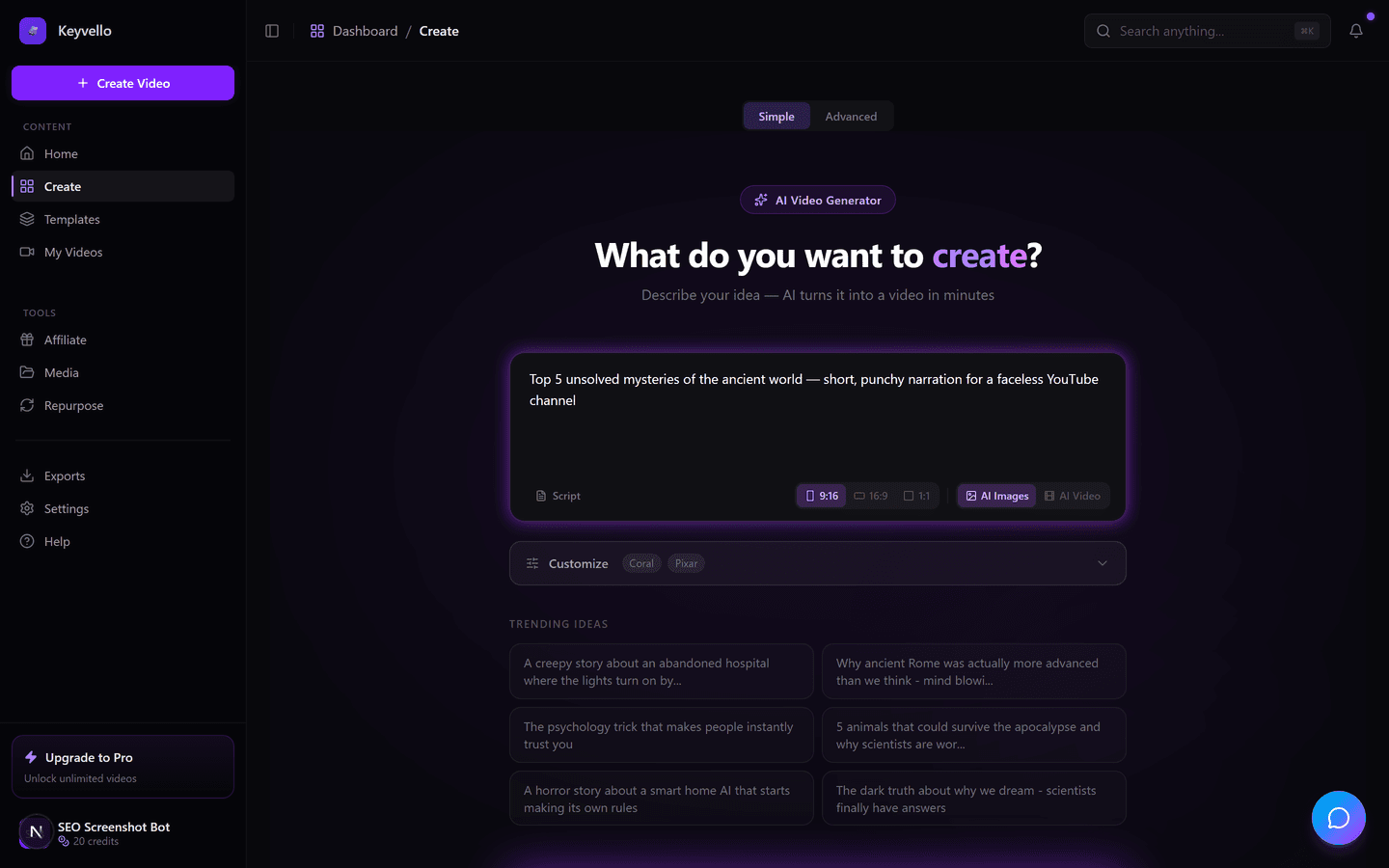
Open the create screen and describe the process, or paste a numbered list of steps directly. A good instructional script reads like spoken instructions: one action per line, the result of that action, then the next move. Keyvello breaks your text into scenes, so each step tends to become its own segment with its own visual and narration.
2. Pick the format and voice
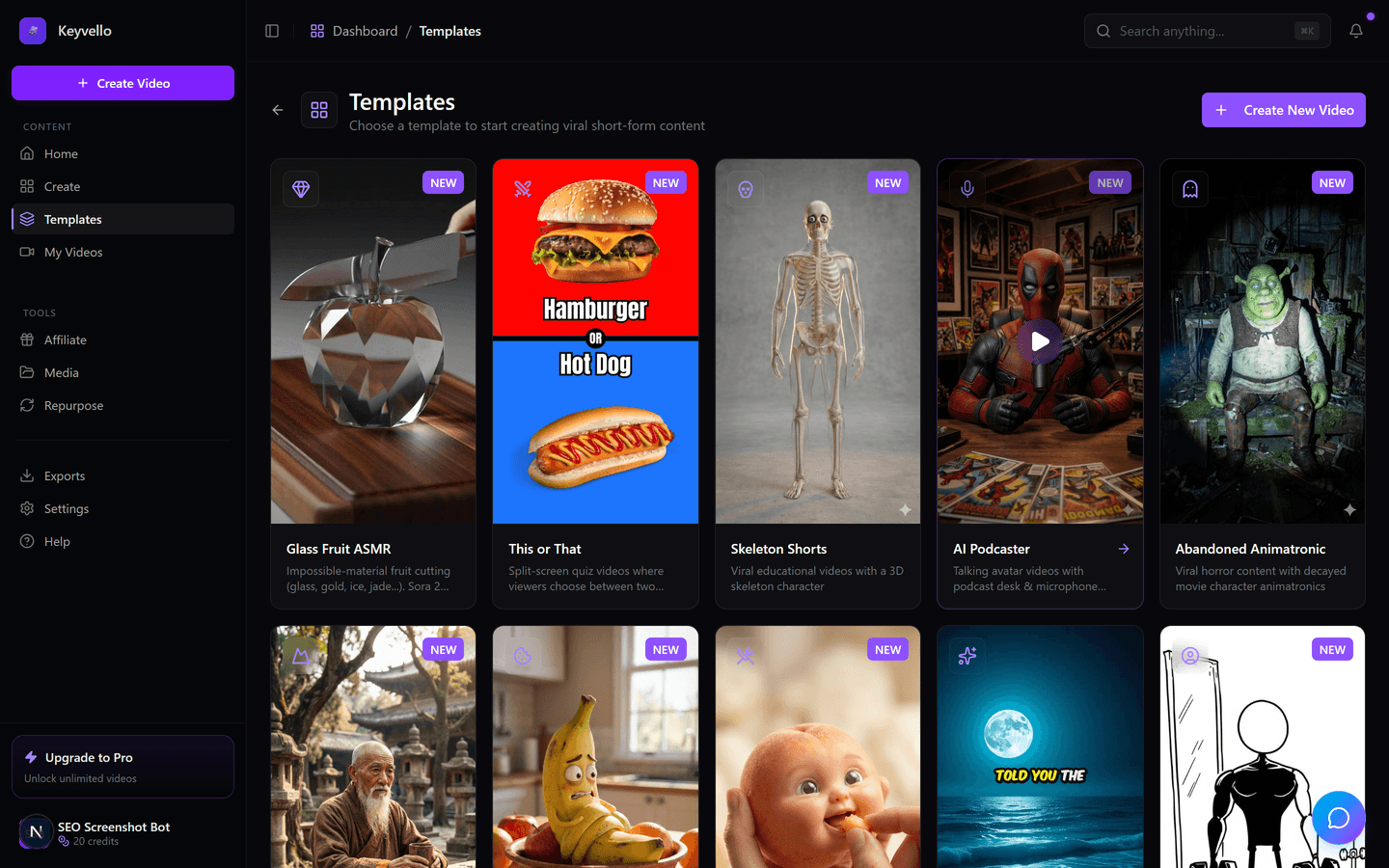
Choose a template that suits an explainer (the straightforward AI Stories format works well for narrated how-tos), then pick a voice. Voiceover runs through ElevenLabs, so the narration sounds like a calm instructor rather than a robotic TTS reader, which matters a lot when someone is trying to follow along.
3. Generate, review, refine
Generation takes roughly 2 to 5 minutes. When it is done you can review each step on screen, regenerate any image that does not match the step it illustrates (1 credit), or redo the voiceover (3 credits) if you want a different read or to fix a pronunciation. You are not stuck with the first pass.
See a real output
Below is an actual Keyvello-generated clip. It is not a step-by-step tutorial itself, so judge it for what it shows: the visual fidelity, the pacing, and the narration quality you would get applied to your own instructional script.
Structuring a how-to so viewers actually finish it
The tool only generates what you tell it, so the quality of your guide lives in how you write the steps. A few things that consistently make instructional videos clearer:
One action per step
Do not bundle. "Open the settings menu and scroll to billing and click cancel" should be three steps, not one. When each line is a single action, the tool gives each its own scene, and the viewer can pause exactly where they need to.
State the outcome before the next action
After each instruction, add a short line confirming what the viewer should now see. It reassures people they are on track, and it gives the narration a natural rhythm instead of a flat list.
Front-load the goal and the prerequisites
Open with what the finished result is and what they need before starting (an account, a file, a tool). People decide in the first few seconds whether a how-to is for them, so tell them immediately.
Keep it short, then split if needed
The average video generated on Keyvello is about 36 seconds. Instructional content can run longer, but a tight 60 to 90 second guide on a single task beats a sprawling 5-minute one nobody finishes. For a big workflow, make a short video per stage and link them as a series.
Add captions for muted, follow-along viewing
People watch how-tos on a second screen with the sound off while they do the thing. On-screen captions (+2 credits) let them follow without audio, and they reinforce each step in text.
What it actually costs
Credits map to length and quality, so you can plan a batch of guides precisely. A typical short explainer is around 15 credits. Base-quality AI-image videos cost: 30s = 10 credits, 60s = 18, 90s = 25, 3min = 40, 5min = 70, 10min = 120. Captions add 2. Quality tiers multiply the base (base 1x, pro 1.5x, ultra 2.5x). Note that fully AI-generated video (motion, not still images with narration) is much pricier, around 60 credits for 30s and 108 for 60s, so most cost-conscious instructional creators stick with the narrated-image format. New accounts start with 20 free credits and no card.
Honest comparison: where each tool fits
These tools solve overlapping but genuinely different problems. The biggest split is screen-capture documentation versus narrated explainer video. Pricing and details below were checked live in May 2026; always confirm on each vendor's own page before buying.
| Tool | Core approach | Best for | Free tier | Watermark | Entry paid price |
|---|---|---|---|---|---|
| Keyvello | Prompt/script to narrated AI video | Conceptual how-tos, processes, explainers | Generate + preview free (download needs paid) | None on any plan | $19/mo |
| Scribe | Auto screen + click capture into text guides | Click-by-click software docs, SOPs | Unlimited web capture; no PDF export on free | n/a (text/image guides) | ~$23/seat/mo (check site) |
| Guidde | AI screen-capture into video docs | Recording your own app/UI workflows | Up to 25 videos, with watermark | Yes on free; removed on Pro | $19/mo annual (check site) |
| Pictory | Script to video with stock footage | Repurposing articles into stock-footage clips | Trial: 3 projects, watermarked | Trial watermarked; removed on paid | $19/mo (check site) |
When another tool is the better call
Be honest with yourself about the type of guide. If you need to show exact clicks inside your own software (the literal buttons and menus of your dashboard), a screen-capture tool wins, because it records your real interface instead of generating an approximation. For that, Scribe is excellent for fast text-and-screenshot SOPs, and Guidde is strong for AI-narrated captures of a UI. If your goal is a polished talking-head tutorial, recording yourself on Loom (check site for current plans) is more authentic than any AI render. Keyvello earns its place when the steps are conceptual or visual rather than UI-specific: a recipe, a fitness routine, a setup process, a finance walkthrough, a study method, where narrated illustrative visuals communicate better than a screen recording.
Why creators trust the output
So far more than 9,000+ videos have been generated by 6,000+ creators on Keyvello, with 2,400+ in the last 30 days alone. The no-watermark-on-any-plan policy and the free-preview-before-you-pay model exist for the same reason: you should be able to see exactly what your step-by-step video looks like before money changes hands.
Start free
Make your first instructional video on the free 20-credit account, no card required. Write your steps, pick a voice, and preview the full result. When you are happy with it, a paid plan ($19/mo Starter, $39/mo Plus, $99/mo Pro) unlocks downloads, and nothing you export ever carries a watermark.
Frequently Asked Questions
Can I make a step-by-step video for free?
Yes. A new account comes with 20 free credits and no credit card. You can write your steps, generate the full video, and preview every step. The one honest limit is that downloading the finished file requires a paid plan ($19/mo Starter and up). Preview is free so you can judge the result before paying.
Is this a screen recorder like Scribe or Guidde?
No, and that distinction matters. Scribe and Guidde capture your real screen and clicks to document a specific software UI. Keyvello generates a narrated explainer video from your written steps using AI visuals and voiceover. If you need exact click-by-click of your own app, use a screen-capture tool. If you are explaining a process or concept, Keyvello fits better.
How long does it take to generate an instructional video?
Roughly 2 to 5 minutes from finished script to a previewable video. After it generates you can regenerate any single image for 1 credit or redo the voiceover for 3 credits, so refining specific steps is quick and cheap.
How many credits does a how-to video cost?
It depends on length and quality. Base-quality AI-image videos cost 10 credits for 30s, 18 for 60s, 25 for 90s, and 40 for 3 minutes. Captions add 2 credits. A typical short explainer runs about 15 credits. The free 20-credit account covers your first video.
Will my downloaded video have a watermark?
No. There is no watermark on any plan, including the cheapest paid tier. This is different from several alternatives whose free tiers (and sometimes trials) stamp a watermark you only remove by upgrading.
How should I write the steps for the clearest result?
Use one action per line, state the outcome after each action, and front-load the goal and prerequisites at the start. The tool splits your text into scenes, so a clean numbered list of single actions produces a clean per-step video. Bundled instructions produce crowded scenes.
What kind of voice does the narration use?
Voiceover runs through ElevenLabs, so the narration sounds like a natural human instructor rather than flat text-to-speech. You can choose a voice and, if a read or a pronunciation is off, redo just the voiceover for 3 credits.
Start Creating Create Engaging Step By Step Guides with Keyvello AI Videos
AI-generated create engaging step by step guides with keyvello ai videos in minutes. Try it free.
Get Started Free