Popular Video Makers: What Creators Actually Use in 2026 (and Why)
An honest rundown of the video makers creators actually use in 2026 across AI generators, manual editors, and mobile apps, plus where each one genuinely fits.
Use Cases
TL;DR: "Popular video maker" isn't one tool - it's three different jobs. Most creators use a manual editor (CapCut, Premiere) for footage they shot themselves, a mobile app for quick edits on the go, or an AI generator (Keyvello, Revid, InVideo) when they have no footage at all and want a finished video from a text prompt. The "most popular" answer depends entirely on whether you're cutting your own clips or producing faceless content from scratch. Below is a category-by-category breakdown, an honest comparison table with current prices, and where Keyvello fits (the faceless-AI slot) versus where it genuinely doesn't.
The three buckets every "popular video maker" falls into
When someone searches for a popular video maker, they usually mean one of these, and the right pick changes completely depending on which one you are:
- Manual editors - you already shot footage and need to cut, caption, and color it. CapCut, Adobe Premiere, DaVinci Resolve, Final Cut.
- Mobile apps - you film on a phone and want to edit on the same phone in a few taps. CapCut mobile, InShot, VN.
- AI generators - you have an idea but no footage, and you want a complete video (script, voice, visuals, captions) generated for you. Keyvello, Revid.ai, InVideo AI.
Keyvello only competes in the third bucket - faceless AI video where you start from a prompt, not a camera roll. If you have footage to cut, an AI generator is the wrong tool and I'll say so plainly later on.
How the AI-generator route works, in three steps
If the faceless-AI category is the one you're after, here's the actual flow inside Keyvello so you can judge whether it matches how you want to work.
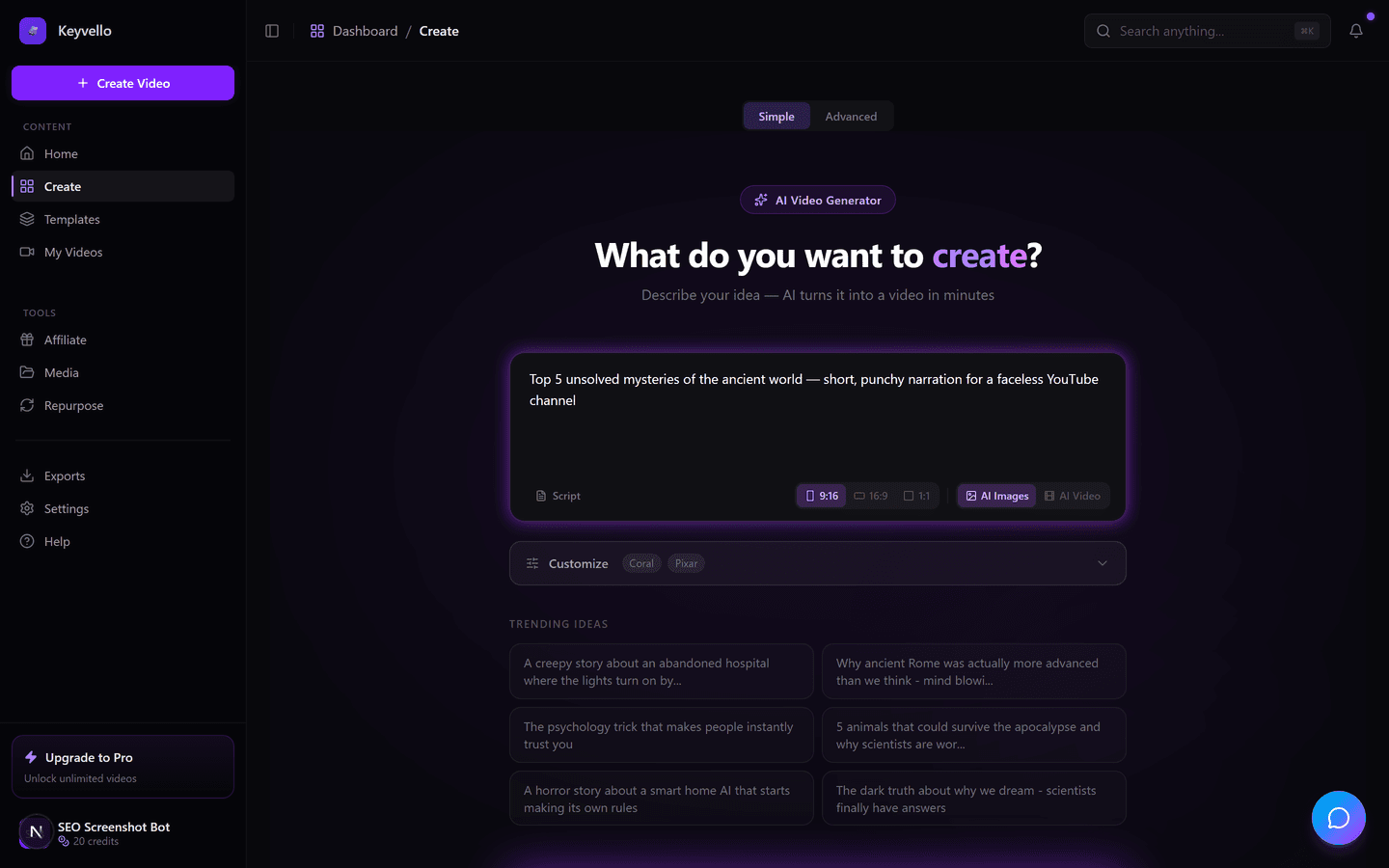
1. Describe the video
You type a topic or paste a script. There's no timeline, no clip library, no footage to source - the prompt is the input. New accounts get 20 free credits with no card required, so you can run this end to end before deciding anything.
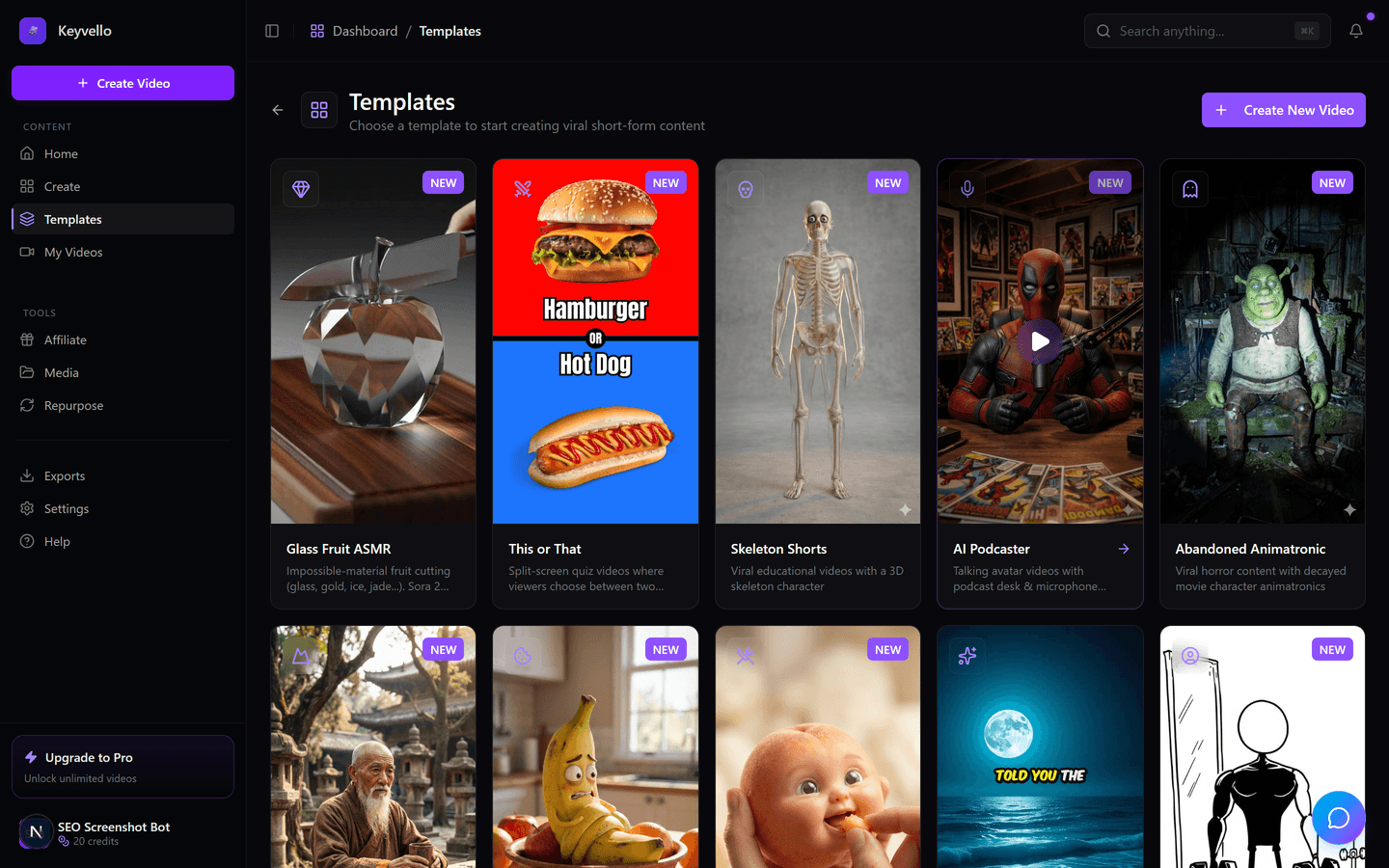
2. Pick a template
The template decides the look - AI Stories with generated images, Fake Texts, Stick Animation, Kids Stories, and others (11 total). This is the part manual editors don't have: the format is pre-built, so you're choosing a style rather than assembling one from scratch.
3. Generate, then review
The script (GPT-4o), voice (ElevenLabs), visuals, and captions are produced together. A typical short takes 2-5 minutes. You can preview the whole thing for free; you regenerate any single image for 1 credit or redo the voice for 3, so you fix the one weak scene instead of restarting.
See a real output before you trust the category
Talk is cheap with AI video, so here's an actual Keyvello render. Watch it as a quality sample of the AI-generator approach - it is an example of the output, not a claim that your exact niche will look identical:
If that level of polish is enough for your channel, the AI route saves you the entire shoot-and-edit cycle. If you're a hands-on editor who needs frame-level control, it won't replace your timeline - and that's fine.
What each type of creator actually reaches for
Here's the honest mapping by who you are, because "popular" means different things to a vlogger and a faceless channel.
You film yourself (vlogs, talking-head, product demos)
Reach for a manual editor. CapCut is the default for most phone-and-laptop creators because it's free and fast; Premiere or DaVinci Resolve if you need real grading and multi-track control. An AI generator is the wrong category here - you already have the footage, you just need to cut it.
You're a faceless / niche-content channel (no footage)
This is the AI-generator slot. You're producing story-time, listicle, motivational, or kids content where the visuals are generated, not filmed. Keyvello, Revid.ai, and InVideo AI all live here. The differentiators are visual quality, voice naturalness, template variety, and pricing model - not whether they edit your clips, because there are no clips.
You post daily and edit on your phone
A mobile app wins. CapCut mobile, InShot, and VN are built for fast trims, trending audio, and one-tap captions. AI generators are usually web-first and tuned for batch production, so they fit a "sit down and make ten videos" workflow more than a "film and post in five minutes" one.
A real cost data point (so the numbers aren't hand-wavy)
In the faceless-AI category, the question that actually decides your bill is AI images vs. AI video. On Keyvello, a 30-second image-based short costs around 10 credits (60s = 18, 90s = 25; captions add 2). The same 30 seconds rendered as true AI video costs roughly 60 credits - about six times more - and a 60-second AI-video clip is around 108. Quality tiers multiply that (base 1x, pro 1.5x, ultra 2.5x). The practical takeaway: most popular faceless formats are image-based, which is why they stay cheap, and you only pay the AI-video premium when the format genuinely needs motion. Knowing this up front is the difference between a $19 month and a surprise.
Honest comparison: the popular options side by side
Prices verified May 2026 from each vendor; where a number shifts by region or device, I've flagged it as "check site" rather than guessing.
| Tool | Category | Starting paid price | Free tier | Watermark | Best for |
|---|---|---|---|---|---|
| Keyvello | AI generator (faceless) | $19/mo (Starter; Plus $39, Pro $99) | 20 credits, no card - preview only, download needs a paid plan | None on any plan | Prompt-to-video faceless shorts |
| Revid.ai | AI generator (faceless) | $39/mo Hobby; Growth $99, Ultra $199 (revid.ai/pricing) | Limited free credits (check site) | Check site | Auto-mode batch + auto-posting |
| InVideo AI | AI generator | Plus ~$25/mo removes watermark (invideo.io/pricing) | ~10 AI min, watermarked (check site) | On free exports | Prompt-to-video with stock footage |
| CapCut | Manual editor + mobile | Pro ~$9.99-$19.99/mo, varies by region (check site) | Generous free editor | Branded end-clip / AI-feature watermark (check site) | Cutting footage you filmed |
Two notes I won't bury: CapCut's free editor is genuinely excellent and costs nothing, and Revid's auto-mode (it can publish on a schedule) is something Keyvello doesn't do. Those are real advantages.
When another tool is the smarter pick
I'd rather you choose right than choose us:
- You have your own footage - use CapCut (free) or DaVinci Resolve (free, pro-grade grading). No AI generator beats a real editor when the raw clips already exist.
- You want hands-off auto-posting - Revid.ai's auto-mode workers generate and publish on a schedule; Keyvello doesn't auto-post.
- You only edit on a phone, daily - a mobile app like InShot or CapCut mobile fits that rhythm better than a web-first generator.
- You need frame-perfect control - Premiere or Final Cut. AI generation trades control for speed by design.
Where Keyvello earns the spot
For the faceless-AI bucket specifically, the case is straightforward and the numbers are real: 9,000+ videos have been generated by 6,000+ creators, with 2,400+ in the last 30 days - so this is an active, used tool, not a launch page. No watermark on any plan (including the cheapest), generation in 2-5 minutes, and a free preview so you see your actual video before paying. You only upgrade when you want to download.
Start free with 20 credits and no card - make a real video, preview it, and decide whether the AI route fits how you create. If it doesn't, one of the alternatives above genuinely will.
Frequently Asked Questions
What's the single most popular video maker?
There isn't one, because it depends on the job. CapCut dominates among creators who edit footage they filmed, mobile apps lead for phone-only daily posters, and AI generators like Keyvello, Revid, and InVideo are popular with faceless channels who start from a prompt with no footage. Match the tool to whether you're cutting clips or generating from scratch.
Is a free video maker good enough, or do I need to pay?
For editing your own footage, free tools like CapCut and DaVinci Resolve are genuinely capable. For AI generation, free tiers usually preview your work but gate downloads or add a watermark. Keyvello's free 20 credits let you generate and preview a full video without a card; downloading needs a paid plan, and there's no watermark on any plan.
Which video maker do faceless YouTube and TikTok creators use?
Faceless creators lean on AI generators because they have no footage to edit - the visuals, voice, and script are produced from a text prompt. Keyvello, Revid.ai, and InVideo AI are the common picks. They differ on visual quality, voice (Keyvello uses ElevenLabs), template variety, and pricing model rather than on editing features.
How much does AI video generation actually cost on Keyvello?
It depends on format and length. An image-based 30-second short is about 10 credits (60s = 18, 90s = 25; captions add 2). True AI video is far pricier - roughly 60 credits for 30s and 108 for 60s. Quality tiers multiply costs (base 1x, pro 1.5x, ultra 2.5x). Paid plans start at $19/mo.
When should I NOT use an AI video generator?
When you already have footage. If you filmed something, a manual editor like CapCut (free) or DaVinci Resolve gives you far more control than an AI generator, which is built to create from nothing rather than cut existing clips. Also skip AI generators if you need frame-perfect control or you only edit on your phone day to day.
Do popular video makers add watermarks?
It varies. InVideo AI watermarks free exports. CapCut's free tier appends a branded end-clip and watermarks some AI features (check their site for current rules). Keyvello adds no watermark on any plan, including the cheapest. Always confirm watermark policy before committing, since it's the detail vendors change most often.
Start Creating Create Stunning Videos Easily with Keyvello Video Maker Videos
AI-generated create stunning videos easily with keyvello video maker videos in minutes. Try it free.
Get Started Free