Free Video Maker for YouTube Shorts and Long-Form
A free video maker for YouTube creators. Generate Shorts and long-form free, no card, no watermark on any plan. Honest about the download lock and credit costs.
Use Cases
TL;DR: Keyvello makes faceless YouTube videos from a prompt, free to generate and preview, no card needed (20 credits on signup), with no watermark on any plan. The honest catch: downloading the finished MP4 to upload to YouTube requires a paid plan. Free credits get a Shorts channel real test footage; for long-form the math differs, and this page covers both.
Most "free video maker for YouTube" results bury the same fine print: a logo baked into every clip, a 720p cap, or a weekly export limit that kills daily uploading. This is the version that states the trade-offs up front, split by what you are actually doing on YouTube.
From prompt to upload in three steps
You do not edit a timeline. You describe a video and Keyvello assembles it.
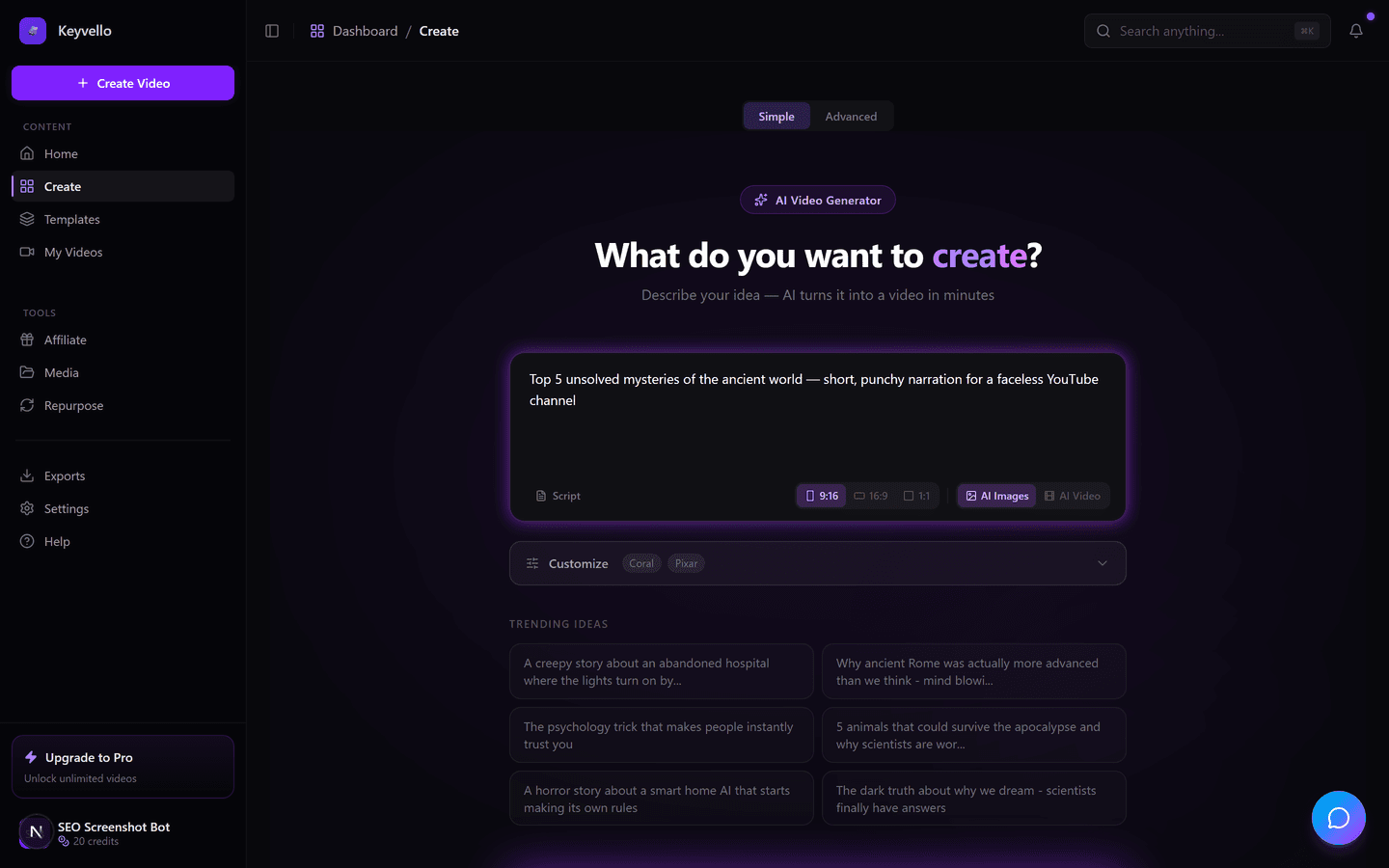
1. Describe the video or paste a script
Type something like "the rise and fall of Blockbuster in 60 seconds" or paste a script you already wrote for a long-form video. The AI drafts the narration, breaks it into scenes, and starts generating images and voiceover at the same time.
2. Choose a format and template
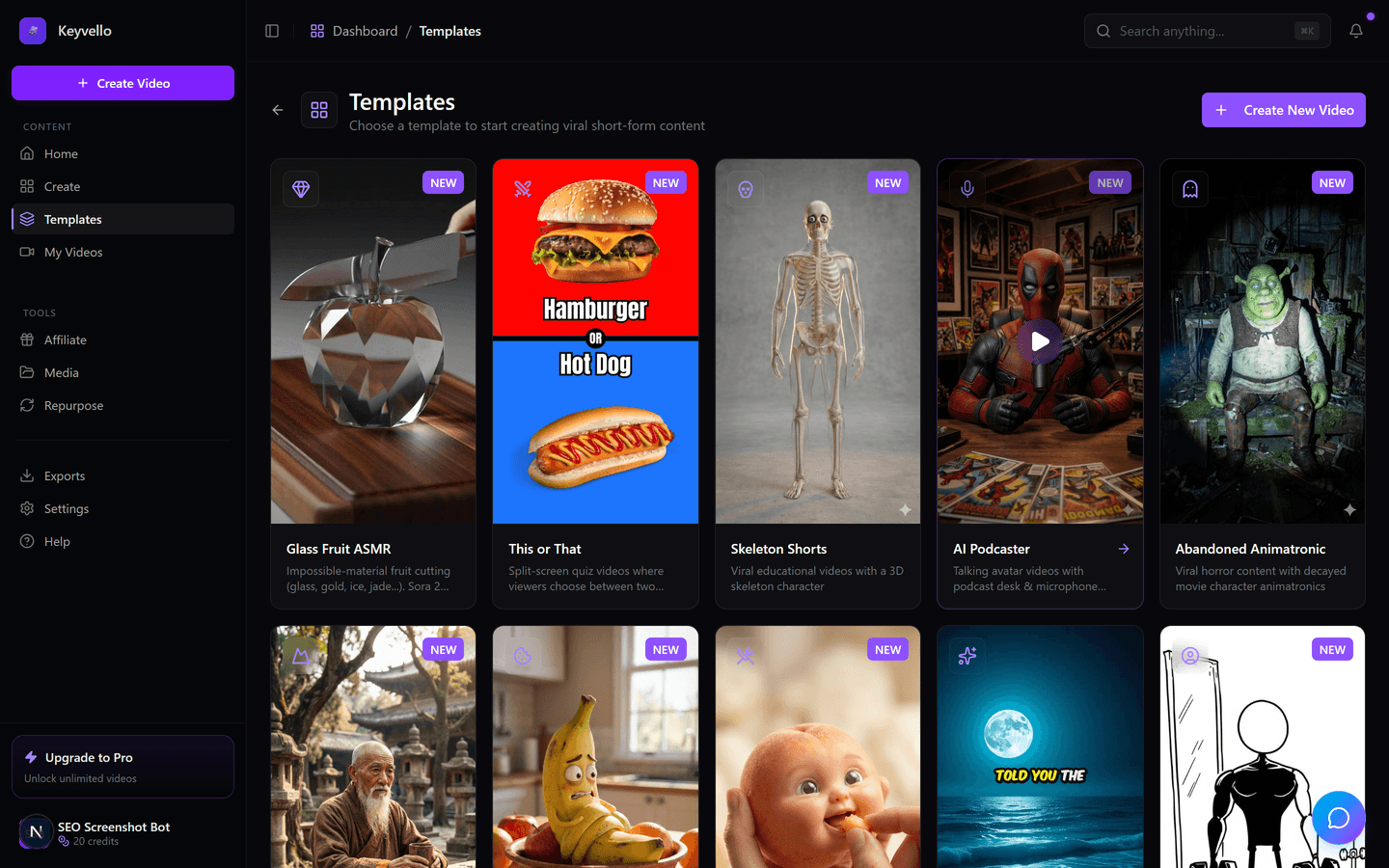
There are 11 templates, including AI Stories, Fake Texts, Stick Animation, Kids Stories, Split Screen and Viral Wisdom. Each one sets the visual style, pacing and caption look. For YouTube specifically, this is where you decide between a punchy vertical Short and a longer horizontal piece for the main feed.
3. Generate, watch, then upload
Generation runs 2 to 5 minutes. You get back a video with AI images, an ElevenLabs voiceover and burned-in captions, fully playable in the browser. Free accounts can watch the whole thing and regenerate weak scenes; uploading to YouTube means downloading the file, which is the paid step.
See a real output before you trust it
This is an actual Keyvello-generated clip, framed honestly as an example of the AI output quality, not a video tuned for one perfect niche. Play it with sound on, the way a YouTube viewer would.
Shorts vs long-form: which one free credits actually fund
YouTube creators are really running two different machines, and the free tier behaves differently for each.
If you are building a Shorts channel
Shorts live or die on volume and the first two seconds. A typical Keyvello short is around 36 seconds and costs roughly 15 credits at base quality, so your 20 free signup credits cover one or two complete shorts you can generate and fully preview. That is enough to answer the only question that matters before paying: do the AI imagery and voice fit your niche and hold a viewer? It is an audition, not a free content pipeline, and anyone selling a $0 daily-Shorts factory is hiding a watermark or a weekly cap.
If you are building a long-form channel
Long-form is a different cost shape because credits scale with length. A 5-minute base-quality video is 70 credits and a 10-minute one is 120, so the free 20 credits will not produce a full long-form upload. The free tier is best used here to test a single 30 to 90 second segment, an intro or a hook, before building a longer piece around it. Long-form on Keyvello leans on the AI-image templates rather than full AI video, because AI video is far pricier (around 60 credits for 30 seconds, ~108 for 60 seconds), which keeps a 10-minute explainer affordable.
What "free" really means here (and the monetization reality)
Two things every YouTube creator should weigh:
- Free covers generation and preview, not download. You can create across all 11 templates, watch the complete result with real audio and captions, and regenerate scenes (1 credit per image, 3 for a voice redo). Getting the MP4 to upload requires a paid plan. We say it plainly because the alternative most tools use, a free watermarked export, is not a file you would ever put on a channel you care about.
- No watermark on any plan. This matters for monetization. YouTube's reused-content and originality expectations mean a third-party logo stamped on your video is a liability, and a watermark screams "template tool" to viewers. Every Keyvello export, on the $19 Starter plan upward, is clean.
One honest caveat: AI-assisted faceless video can earn through YouTube once you hit the Partner Program thresholds, but mass-produced low-effort AI uploads are exactly what YouTube has been demonetizing. The tool gets you a clean, fast video; the channel still needs a real angle to monetize.
What a video actually costs in credits
Cost scales with length, captions and quality tier, not a flat per-video fee. Base-quality breakdown:
| Video length | Base credits | + Captions |
|---|---|---|
| 30 seconds (Short) | 10 | 12 |
| 60 seconds (Short) | 18 | 20 |
| 90 seconds | 25 | 27 |
| 3 minutes (long-form) | 40 | 42 |
| 5 minutes (long-form) | 70 | 72 |
| 10 minutes (long-form) | 120 | 122 |
Quality multipliers stack on top: base 1x, pro 1.5x, ultra 2.5x. So a 60-second Short is 18 credits at base or 45 at ultra. With 20 free credits you can ship and preview about one or two base-quality Shorts, which is the deliberate point: enough to judge quality, not enough to run a channel for free.
Honest comparison for YouTube creators
Every tool below has a free entry point, but the YouTube-relevant details differ. Facts checked against each company's public materials in 2026; where a tool's site is unclear, the cell says "check site" instead of a guess.
| Tool | Type | Free output for YouTube | Watermark on free? | Cheapest paid | Best YouTube fit |
|---|---|---|---|---|---|
| Keyvello | Prompt-to-video (faceless) | Generate + preview free; download needs paid | No watermark on any plan | $19/mo (Starter) | Faceless Shorts & mid-length AI-image videos |
| CapCut | Manual editor (some AI) | Free export, up to 4K on standard edits | No on standard edits; some templates add one (source) | Free / Pro tier (check site) | Hands-on editing of footage you filmed |
| Canva | Drag-and-drop editor | Free MP4 export if you use only free elements | Only when Pro elements are used (source) | ~$15/mo (Pro, check site) | Thumbnails + simple template-based videos |
| InVideo AI | Prompt-to-video (stock) | Limited weekly free exports, 720p | Yes, baked into free exports (source) | ~$25-28/mo (Plus) | Stock-footage explainers & marketing |
| Pictory | Article/script-to-video | Trial only, watermarked | Yes on trial (check site) | ~$19/mo (Starter, annual) | Repurposing blog posts into video |
The split is clear. Manual editors like CapCut and Canva genuinely let you export free, but you do the editing and you need source footage. AI prompt-to-video tools mostly gate free exports behind a watermark and 720p. Keyvello sits in the AI prompt-to-video camp but refuses the watermark trade entirely: free means a clean preview, and paid means a clean download, never a branded one.
When a different tool is the smarter pick
No tool wins everything. If you film yourself and just need to cut and caption that footage, CapCut is free, exports up to 4K, and is built for it. If your channel is mostly thumbnails plus light template videos, Canva covers both. If you turn written articles into stock-footage explainers, Pictory is purpose-built for that. And if you want a realistic talking-head presenter, HeyGen or Synthesia beat any faceless tool. Reach for Keyvello when your YouTube plan is faceless, narrated video, Shorts or mid-length, generated fast and in volume without filming or editing.
Real usage, not a demo reel
Creators have generated more than 9,000 videos on Keyvello, including over 2,400 in the last 30 days, across a community of 6,000+ creators. That is recurring usage from people uploading to real channels, not a one-time screenshot.
Start free, no card
You can find out whether AI video fits your YouTube channel without paying anything. Make an account, claim 20 credits, generate a Short or a long-form segment on the template that matches your niche, and watch the full preview. If the quality earns it, the cheapest paid plan is $19/mo, which lifts the download lock with no watermark on anything you export.
Frequently Asked Questions
Is this video maker actually free for YouTube, or just a trial?
It is genuinely free to start, not a countdown trial. New accounts get 20 credits with no credit card required, and you use them to generate and fully preview real videos. The one paid step is downloading the MP4 so you can upload it to YouTube.
Will my YouTube videos have a watermark?
No. Keyvello does not add a watermark on any plan, including the free preview. That matters for YouTube specifically, because a third-party logo looks unprofessional to viewers and works against originality. The free-tier limit is the download lock, not branding on the video.
Can I download a video for free to upload to YouTube?
No. Generating and previewing are free, but downloading the finished MP4 requires a paid plan (Starter is $19/mo). We are upfront about this because the common free alternative, a watermarked 720p export, is not a file you would actually put on a YouTube channel.
Is it better for YouTube Shorts or long-form?
Both, but the free credits stretch further for Shorts. A 36-second Short costs around 15 credits, so 20 free credits cover roughly one or two. Long-form scales with length (a 5-minute video is 70 credits), so the free tier is best used to test a single segment of a longer piece before committing.
Why is AI video so much more expensive than AI images?
Full AI-generated video is far more compute-heavy: roughly 60 credits for 30 seconds and ~108 for 60 seconds, versus 10 and 18 for the AI-image templates. For long-form YouTube content the AI-image templates keep the cost reasonable, which is why most multi-minute videos use them.
Can I monetize AI-generated videos on YouTube?
Videos you download on a paid plan are yours to upload and monetize, with no watermark to strip and no per-video royalty. That said, YouTube has been demonetizing low-effort mass-produced AI uploads, so a clean video still needs a genuine angle, hook and consistency to qualify and earn.
How long does it take to make one video?
Typically 2 to 5 minutes from prompt to a finished preview, depending on length and quality tier. Images and voiceover generate in parallel to keep it fast, so you are not stuck in a long render queue for a single Short.
Start Creating Free Video Maker Videos
AI-generated free video maker videos in minutes. Try it free.
Get Started Free