Free AI Video Generator That Runs in Your Browser
Make AI videos in your browser with nothing to install. Generate and preview free, no card, no watermark. Honest comparison of browser-based tools inside.
Use Cases
TL;DR: Keyvello is an AI video generator that lives entirely in the browser. There is no app to download, no installer, no GPU to babysit. You open a tab, describe a video, and the rendering happens on our servers, not your laptop. New accounts get 20 credits with no card. The honest part most pages bury: you can generate and fully preview videos for free, but downloading the finished MP4 needs a paid plan. There is no watermark on any plan, so the preview you watch is the real, clean output.
This page is for people who do not want to install desktop software. Maybe you are on a Chromebook, a locked-down work machine, an older laptop, or a phone. Below is how the browser flow works, what the rendering-in-the-cloud trade-off buys you, what a video costs, and an honest table of how the browser-based options compare, including where a desktop tool still wins.
From a tab to a finished short, in three steps
Everything happens on a web page. You never leave the browser, and the heavy lifting runs server-side, so a cheap laptop performs the same as a workstation.
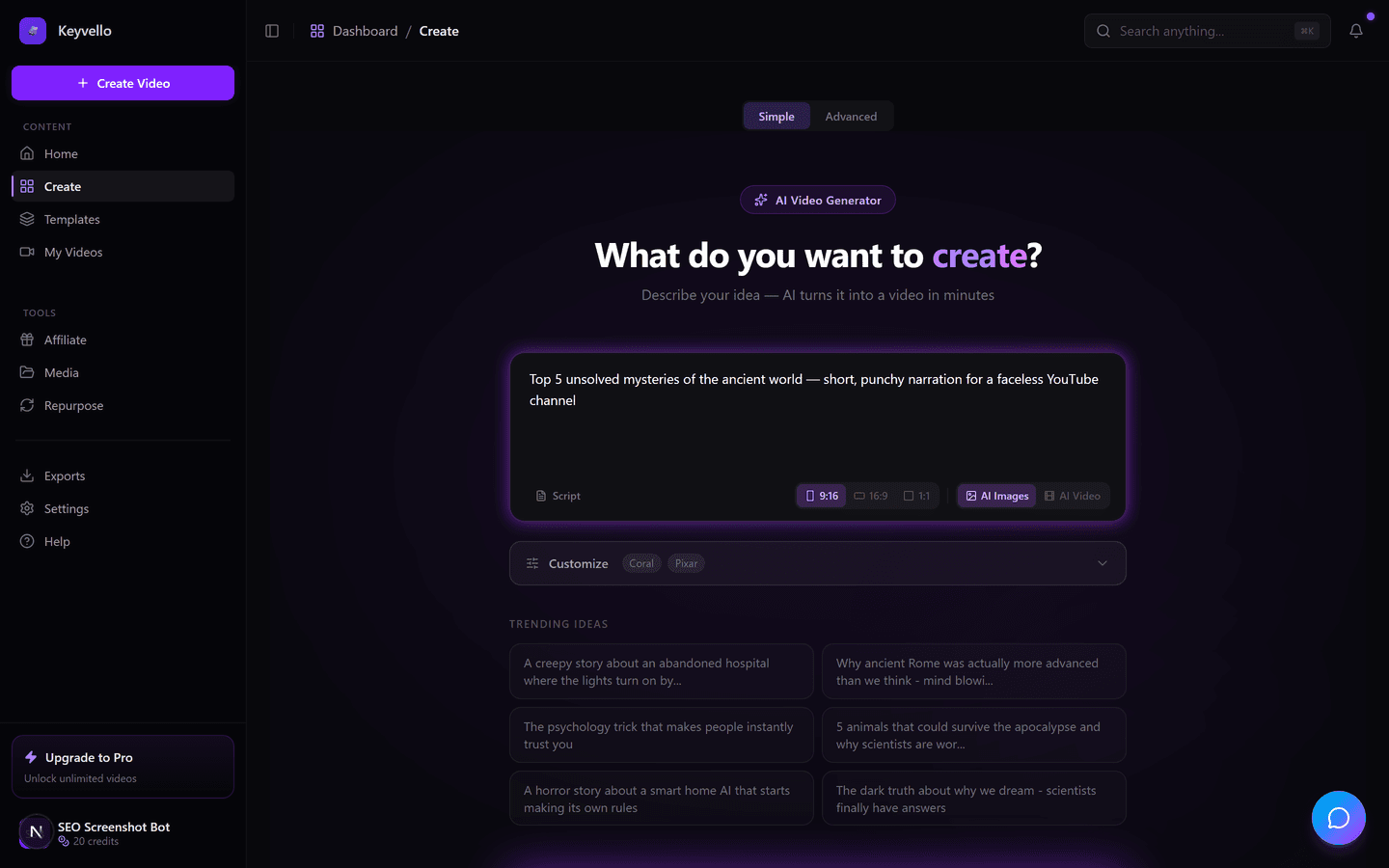
1. Type a prompt or paste a script
Describe what you want, like "3 weird facts about the deep sea," or paste a script you already have. The AI writes the narration, breaks it into scenes, and queues images and voiceover at the same time.
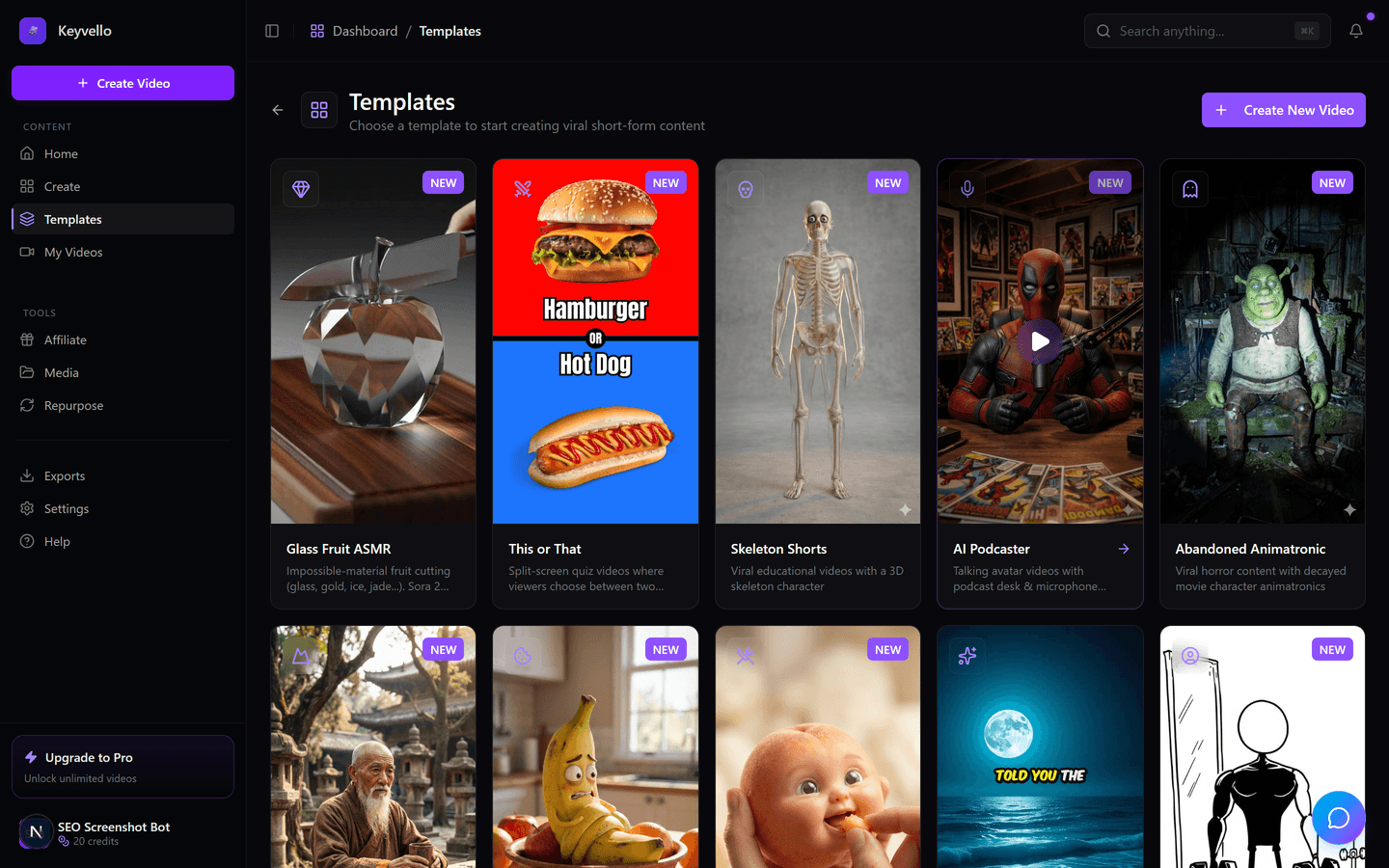
2. Choose a template
Pick from 11 templates built for faceless short-form: AI Stories, Fake Texts, Stick Animation, Kids Stories, Split Screen, Viral Wisdom and more. The template sets the visual style, pacing and caption look, so there is no timeline to learn and nothing to art-direct.
3. Generate, then watch it in the same tab
Rendering takes about 2 to 5 minutes and runs on our infrastructure. When it is done, the finished 9:16 video, with AI images, an ElevenLabs voiceover and burned-in captions, plays right there in your browser. Because nothing renders locally, you can start a generation, close the laptop lid, and the job still finishes.
See a real output
This is an actual Keyvello-generated clip, shown as an honest example of the AI output quality, not a hand-tuned marketing render and not this exact niche. Watch it on a phone with sound on, the way an audience scrolls.
Why running in the browser actually matters here
"Online" is not just a convenience checkbox. For AI video specifically, where the work is generating images and synthesizing voice, the rendering is genuinely better off in the cloud. A few situations where browser-based wins outright:
- Chromebooks and low-spec laptops: Desktop editors like DaVinci Resolve or Premiere lean on a strong GPU; serious local AI tooling is often quoted at 16GB of VRAM or more (ventureharbour.com). A browser tool offloads all of that, so a $300 Chromebook produces the same result as a workstation.
- Locked-down or shared computers: Work laptops, school machines and library PCs often block installs entirely. A tab needs no admin rights and leaves nothing behind.
- Phones and tablets: You can kick off a generation from your phone on the couch. No mobile app to update, no storage warning.
- Disk and update fatigue: Desktop editors are multi-gigabyte installs with constant updates. For a 30-second short, that overhead is the whole job.
The honest trade-off: browser tools depend on a stable internet connection. For most faceless-content workflows that is a fair deal; for offline editing on a plane, it is not.
What you get without installing or paying
Being blunt, because creators batch content and need the real ceiling:
- Full generation from a prompt, topic or script, across all 11 templates, entirely in the browser.
- Complete preview in the tab, with real audio and captions, at full quality. No watermark sits on it, so what you watch is the genuine output.
- Cheap iteration: regenerate an image you do not like for 1 credit, redo the voice for 3, until your credits run out.
- What is gated: downloading the finished MP4 requires a paid plan. We say that plainly instead of handing you a watermarked, low-res "free" export you cannot actually post.
What a video really costs
Keyvello runs on credits, and cost scales with length, captions and quality tier rather than a flat per-video fee. The average video our creators make is about 36 seconds and costs roughly 15 credits. Base-quality breakdown:
| Video length | Base credits | + Captions |
|---|---|---|
| 30 seconds | 10 | 12 |
| 60 seconds | 18 | 20 |
| 90 seconds | 25 | 27 |
| 3 minutes | 40 | 42 |
| 5 minutes | 70 | 72 |
| 10 minutes | 120 | 122 |
Quality multipliers stack on top: base is 1x, pro is 1.5x, ultra is 2.5x. So a 30-second base video is 10 credits and the same clip at ultra is 25. One note worth flagging: full AI video generation (animated footage rather than AI images plus narration) is far pricier, around 60 credits for 30 seconds and 108 for 60. With 20 free signup credits you can generate and preview roughly two 30-second image-based shorts before deciding to upgrade. That is deliberately enough to judge quality, not enough to run a channel for $0.
Browser-based options compared, honestly
These are the tools people actually weigh when they want no install. Facts were checked against each company's public pages in 2026; where a tool does not clearly state something, the cell says "check site" instead of a guess.
| Tool | Runs in browser? | Install needed? | Watermark on free output? | Free downloads? | Best for |
|---|---|---|---|---|---|
| Keyvello | Yes, fully | None | No watermark on any plan | No, download needs a paid plan ($19/mo) | Faceless short-form across 11 templates |
| Kapwing | Yes, fully | None | Yes, free exports are watermarked | Watermarked only | General browser editing plus AI clips |
| CapCut | Web editor yes; desktop app separate | Optional desktop app for full features | check site (free features narrowed in 2026) | check site | All-round editing; pricing changed in 2026 (source) |
| Runway | Yes, fully | None | check site (limited free credits) | check site | High-end generative clips and VFX |
| InVideo AI | Yes, fully | None | Yes, watermark on free exports | Watermarked only | Stock-footage marketing videos |
The pattern: nearly every browser tool lets you export for free, but only with a watermark, and CapCut in particular narrowed what is free in its 2026 restructure (bigvu.tv). Keyvello takes the opposite trade: no free export at all, but the moment you pay, every video on every plan is clean and full quality with nothing to strip.
When a desktop tool, or a different web tool, is the better call
Browser-based AI generation is not the answer for everything. If you do long-form, color-graded, or multi-cam work, DaVinci Resolve (free desktop) or Premiere Pro stay ahead, with neural-engine features browser tools cannot match locally (ventureharbour.com). If you need a realistic talking-avatar presenter for training or localized enterprise video, Synthesia or HeyGen do that better. If you want generative film-style shots and VFX rather than narrated shorts, Runway leads. And if you specifically want a free in-browser export today and a watermark does not bother you, Kapwing will hand you one. Keyvello is the right pick when your goal is faceless, narrative short-form for Shorts, TikTok and Reels, made fast and in volume, with zero install.
Proof it is real usage, not a demo
Creators have generated more than 9,000 videos on Keyvello, including over 2,400 in the last 30 days, across a community of 6,000+ creators. That is recurring usage from people shipping content from their browsers, not a screenshot reel.
Start free, no install, no card
Open a tab, create an account, get your 20 credits, generate a short on the template that fits your niche, and watch the full preview, all without downloading anything. If the quality earns it, the cheapest paid plan is $19/mo and removes the download lock, with no watermark on anything you export.
Frequently Asked Questions
Do I need to download or install anything?
No. Keyvello runs entirely in your web browser. There is no app, no installer, and nothing to set up. The rendering happens on our servers, so even a Chromebook, an old laptop or a phone can generate the same quality video. You only need a browser and an internet connection.
Will it work on a Chromebook or a locked-down work laptop?
Yes. Because there is nothing to install, it works on machines that block app installs, including Chromebooks, school computers and managed work laptops. You do not need admin rights, and nothing is left on the device afterward.
Is it actually free, or a trial that expires?
It is genuinely free to start, not a timed trial. New accounts get 20 credits with no credit card required, and you use them to generate and fully preview real videos. The one paid step is downloading the finished MP4 file.
Does the free version add a watermark?
No. Keyvello does not put a watermark on any plan, including the free preview. What you watch in the browser is the genuine, clean output. The free-tier limit is that you cannot download the file until you are on a paid plan, not that the video is branded.
Can I download videos for free?
No. Generating and previewing in the browser is free, but downloading the finished MP4 requires a paid plan starting at $19/mo. We are upfront about this because the common alternative is a free watermarked, low-resolution export that is not really usable.
How does an online tool compare to a desktop editor for AI video?
For AI video, the heavy work is generating images and voice, which is better done in the cloud, so a browser tool offloads it from your machine entirely. Desktop editors like DaVinci Resolve or Premiere still win for color grading, multi-cam and offline editing, but they need strong local hardware and an install. For fast faceless shorts, browser-based is usually the better fit.
How long does a video take to generate?
Typically 2 to 5 minutes from prompt to finished preview, depending on length and quality tier. Because the job runs on our servers, you can start it and close the tab or laptop; it keeps rendering and is ready when you come back.
Start Creating Create Engaging Videos Effortlessly with Free Ai Video Generator Videos
AI-generated create engaging videos effortlessly with free ai video generator videos in minutes. Try it free.
Get Started Free