Free AI Video Generator for Total Beginners
Never edited a video? Make one free with AI in minutes. Type a sentence, pick a style, watch the result. Honest free-tier facts, no card needed.
Use Cases
TL;DR: If you have never edited a video and the word "timeline" makes you nervous, this is the gentlest on-ramp there is. You type one sentence; Keyvello writes the script, makes the images, adds a real-sounding voice, and burns in captions for you. New accounts get 20 credits, no card, no app. The catch to know up front: generating and watching is free, but downloading the finished file needs a paid plan. There is no watermark on anything, ever, so the preview you watch is the real, clean video.
Most "free AI video generator" pages assume you already know what a render queue or an aspect ratio is. This one does not. If you can describe an idea out loud, you have every skill you need. Below is the simplest path, what it actually costs, and an honest table of the tools a beginner usually bumps into.
The whole thing, in three steps
There is no software to learn. You will not drag clips, sync audio, or pick fonts. You make three small decisions and the AI handles the rest.
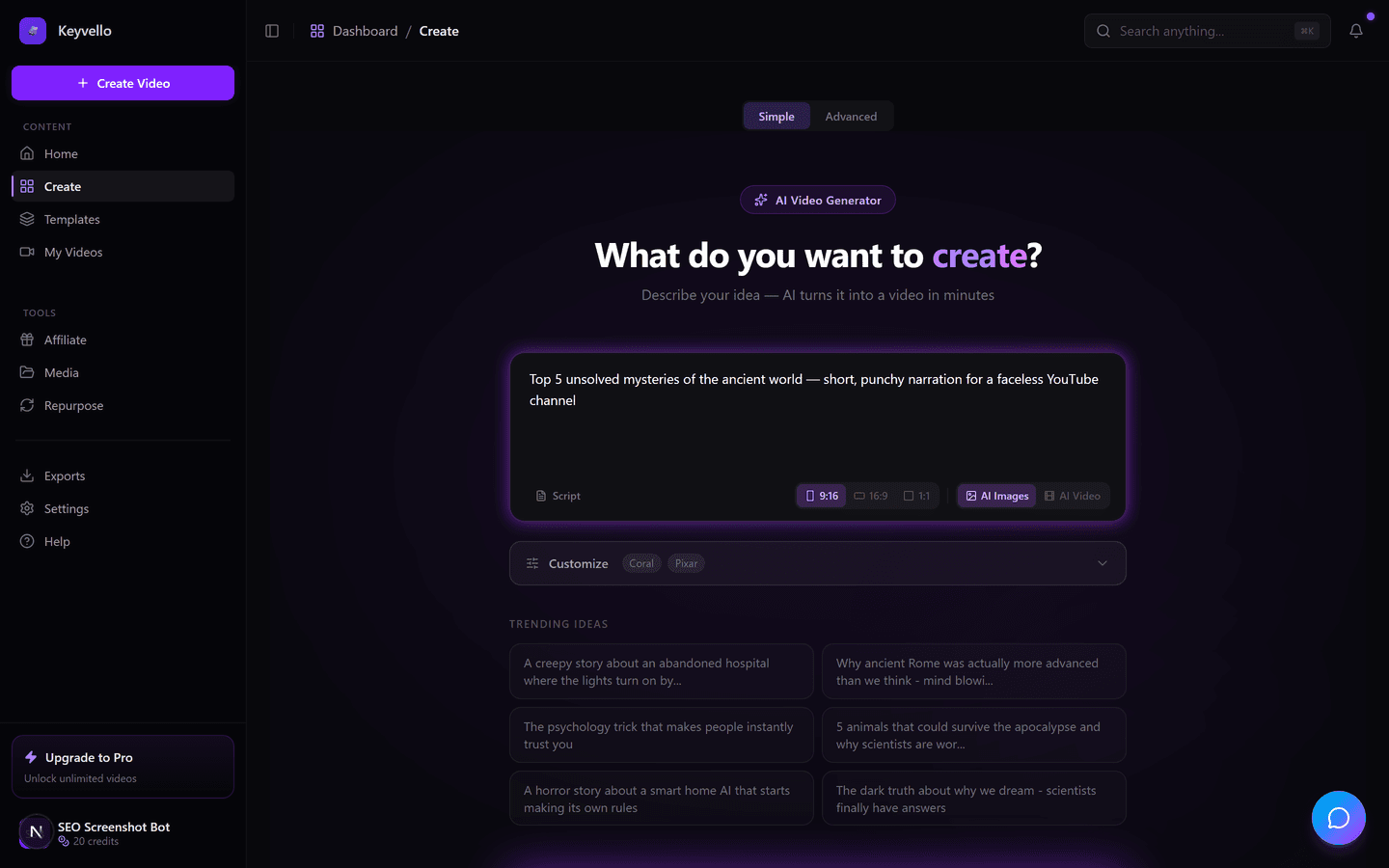
Step 1 - Type what you want, in plain words
In the box, write a normal sentence: "a 30-second video about three weird facts about octopuses," or "a calming bedtime story about a lost star." That is the entire input. Already wrote a script? Paste it instead. The AI turns your sentence into a narrated story split into scenes.
Step 2 - Click a style you like the look of
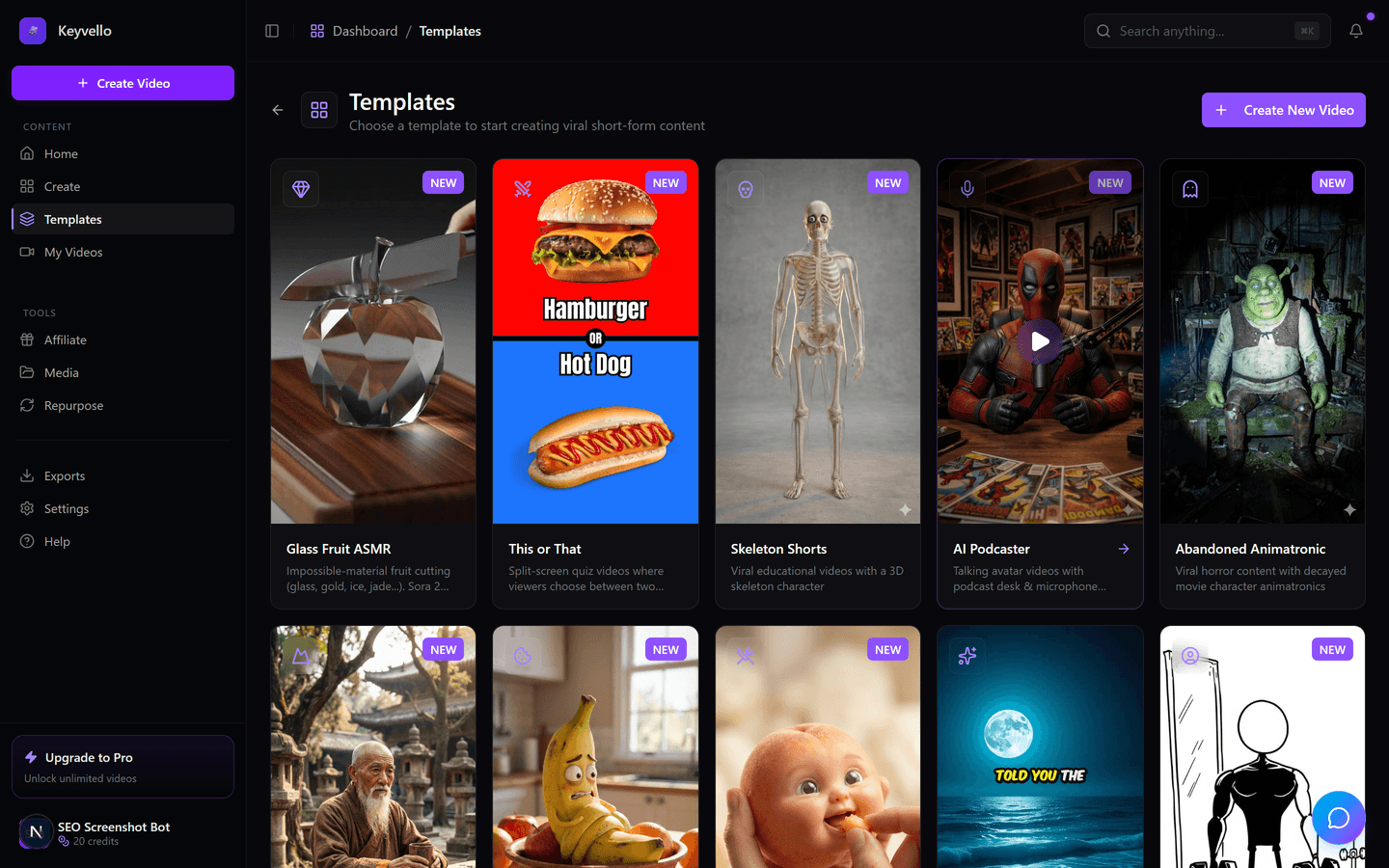
Instead of asking you to design anything, Keyvello gives you 11 ready-made styles (templates). You just click one. AI Stories is the safest first pick - it pairs your narration with AI images. Others include Fake Texts, Kids Stories, Stick Animation and Split Screen. The template decides the visuals, pacing, and caption look, so you never make those calls yourself.
Step 3 - Wait two to five minutes and watch
That is it. Generation usually takes 2 to 5 minutes because the images and voice are made at the same time. You get a finished vertical video - real voiceover (powered by ElevenLabs), AI images, and captions already on screen - playing right in your browser. If one image looks off, regenerate just that image for 1 credit instead of starting over.
See what the AI actually makes
Reading about AI video is one thing; watching it is another. Below is a real clip generated inside Keyvello. Treat it as an honest example of the output quality, not the exact style you will get - your video matches the prompt and template you choose.
Written for people with zero experience
A few honest reassurances if this is your first time, because the jargon scares off more beginners than the work itself:
- You cannot "break" anything. There is no save button to forget and no project file to lose. If a video comes out wrong, you delete it and type a new sentence. Nothing is permanent until you choose to download.
- You do not write a script unless you want to. The AI writes it from your one-line idea; pasting your own is an option for later.
- You do not pick a voice, fonts, or music to begin with. The template sets sensible defaults, so a complete video appears without you touching any of it.
- Your phone is fine. It runs in a browser - no app, no powerful computer. The heavy work happens on Keyvello's servers.
- Redoing is cheap and safe. Regenerate a single image for 1 credit, or redo the voice for 3. You are never stuck with the first try.
The one thing to be clear-eyed about: the free tier is a real audition, not a free factory. You generate and watch at full quality with no watermark, but the download file is gated behind a paid plan. We say that plainly because the usual alternative - letting beginners "export for free" and then stamping a logo on it - wastes your time worse.
What your first videos will cost in credits
You start with 20 credits. Credits are just the unit Keyvello uses, and a short AI-image video is cheap. The average video our creators make is about 36 seconds and costs roughly 15 credits. Here is the plain base-quality price by length:
| Video length | Base credits | With captions |
|---|---|---|
| 30 seconds | 10 | 12 |
| 60 seconds | 18 | 20 |
| 90 seconds | 25 | 27 |
| 3 minutes | 40 | 42 |
| 5 minutes | 70 | 72 |
| 10 minutes | 120 | 122 |
So with your 20 free credits, a 30-second video (10 credits) leaves room to make a second one and test a different style. Two notes so nothing surprises you: a higher quality tier multiplies the cost (base 1x, pro 1.5x, ultra 2.5x), and the separate AI Video option - where the footage itself moves, not just AI images - is much pricier (around 60 credits for 30 seconds). Stick to base-quality AI images at first and your free credits go a long way.
An honest comparison for first-timers
These are the tools a beginner googling "free AI video generator" actually runs into. Each fact was checked against the company's 2026 pricing or help docs (linked below); where a detail is not clearly stated, the cell says "check site" instead of guessing.
| Tool | What you get free | Watermark on free output? | Free downloads? | Easiest for a beginner? |
|---|---|---|---|---|
| Keyvello | 20 credits, no card (~2 short videos) | No watermark on any plan | No - download needs a paid plan | Yes - one sentence in, finished video out |
| InVideo AI | ~10 AI minutes/week (resets weekly) | Yes - hard-coded on free exports | Watermarked only | Beginner-friendly, but watermark on every free export |
| Canva (Magic Media) | ~5 lifetime AI video credits | Free assets only; Pro assets get marked | Yes, with free assets | Very beginner-friendly, but tiny AI video allowance |
| Runway | 125 one-time credits (~2-3 clips) | Yes - watermark + 720p on free | Watermarked, 720p only | Steeper - aimed at hands-on AI filmmaking |
| Pictory | 14-day trial | Yes - watermark on trial output | No - watermark-free needs paid | Easy if you are turning articles into video |
The trade beginners should notice: several of these do let you download for free, but only with a logo stamped on it and often at lower resolution, which usually is not usable on a real channel. Keyvello goes the other way - no free download, but the second you pay, every video on every plan is clean and full quality with nothing to remove.
When a different tool fits you better
No tool is right for everyone. If you literally just want to dabble for $0 with zero commitment, Canva's Magic Media or InVideo's free plan let you export immediately, watermark and all - fine for private experiments. If your goal is hands-on, shot-by-shot AI filmmaking where you direct each clip, Runway or Pika are built for that craft but expect more from you. And if your real task is turning blog posts into video, Pictory is purpose-built for it. Keyvello is the better choice specifically when you want a complete, narrated short - for Shorts, TikTok or Reels - made fast, from one sentence, without learning any editor.
This is not a toy demo
Plenty of beginners worry these tools are gimmicks. The usage says otherwise: creators have generated more than 9,000 videos on Keyvello, including over 2,400 in the last 30 days, across a community of 6,000+ creators - real, repeat use by people who started exactly where you are.
Make your first one free
You do not need a card, an app, or any prior experience to find out whether you can make an AI video. Create an account, get your 20 credits, type a single sentence, click a style, and watch the result a few minutes later. If you like what you see, the cheapest paid plan is $19/mo (Starter) and lifts the download lock - with no watermark on anything you export. Plus is $39/mo and Pro is $99/mo for higher volume.
Frequently Asked Questions
I have never edited a video. Can I really do this?
Yes. The hardest part is typing one sentence describing your idea. The AI writes the script, generates the images, adds a voiceover and puts captions on screen for you. There is no timeline, no dragging clips, and no software to install. If you can describe an idea in words, you have every skill required.
Is it actually free to start, or a trial that expires?
It is genuinely free to start, not a countdown trial. New accounts get 20 credits with no credit card required, and you use those to generate and watch real videos. The one paid step is downloading the finished file. Generating and previewing stays free.
Will there be a watermark on my free video?
No. Keyvello does not put a watermark on any plan, including the free preview. What you watch in the browser is the genuine, clean video. The free-tier limit is that you cannot download the file until you are on a paid plan - it is not that your video is branded or crippled.
How many videos can I make with the free credits?
About two short videos. You start with 20 credits, and a base-quality 30-second video costs 10 credits (12 with captions). You can also spend them on regenerating individual images (1 credit each) while you experiment to get the look right.
Do I need a powerful computer or to download an app?
No. Everything runs in your web browser, so a normal phone or laptop is fine. All the heavy generating happens on Keyvello's servers, not your device, and there is nothing to install.
What if the video comes out wrong on my first try?
Nothing is permanent until you choose to download, so you cannot break anything. If a single image looks off you can regenerate just that one for 1 credit, or redo the voice for 3 credits. If the whole thing misses, delete it and type a new sentence.
What is the cheapest way to download my videos?
The Starter plan at $19/mo removes the download lock and lets you export clean, full-quality MP4s with no watermark. Plus is $39/mo and Pro is $99/mo for people making a higher volume of videos.
Start Creating Create Stunning Videos Effortlessly with Free Ai Video Generator Videos
AI-generated create stunning videos effortlessly with free ai video generator videos in minutes. Try it free.
Get Started Free