Free AI Video Maker for Faceless Creators
A genuinely free AI video maker for faceless Shorts, TikTok and Reels. Generate and preview videos free, no card, no watermark, with an honest competitor comparison.
Use Cases
TL;DR: Yes, you can make AI videos for free with Keyvello. New accounts get 20 credits with no card required, which is enough to generate and fully preview about two short videos. The honest catch most tools hide: downloading the finished MP4 needs a paid plan. The upside is there is no watermark on any plan, so you are previewing the real, clean output, not a crippled demo.
If you run a faceless channel and you have been burned by "free" tools that slap a logo across every clip or cap you at 720p, this page is the straight version. Below is exactly what you can do on the free tier, what a video really costs in credits, and an honest table comparing Keyvello to Revid, Pictory, InVideo and Fliki, including the cases where one of them is the better pick.
How it works in three steps
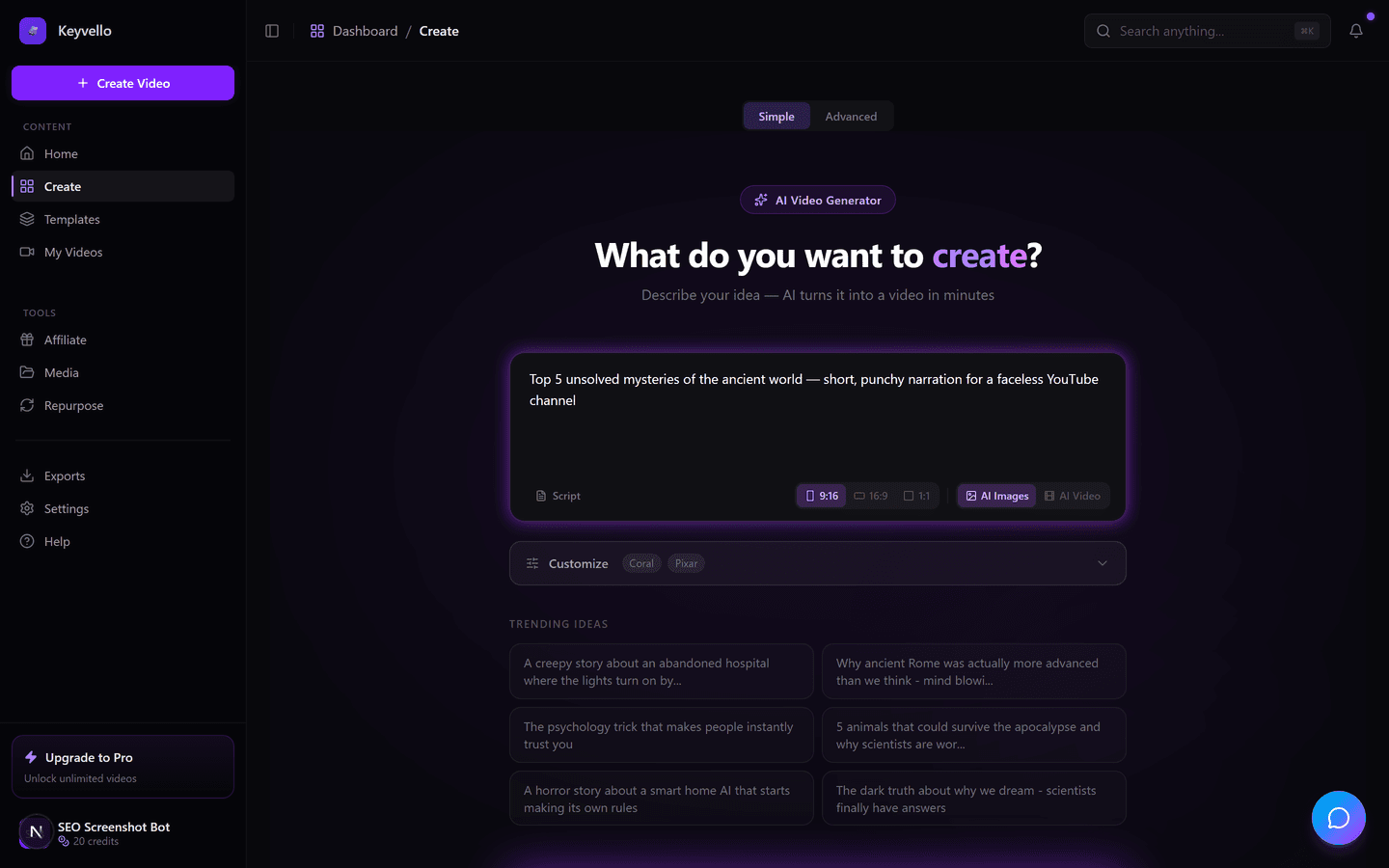
Keyvello turns a sentence into a finished short. There is no timeline editing to learn before you see a result.
1. Describe the video or paste a script
Type a prompt like "3 unsolved deep-sea mysteries" or paste a script you already wrote. The AI writes the narration, splits it into scenes, and queues images and voiceover in parallel.
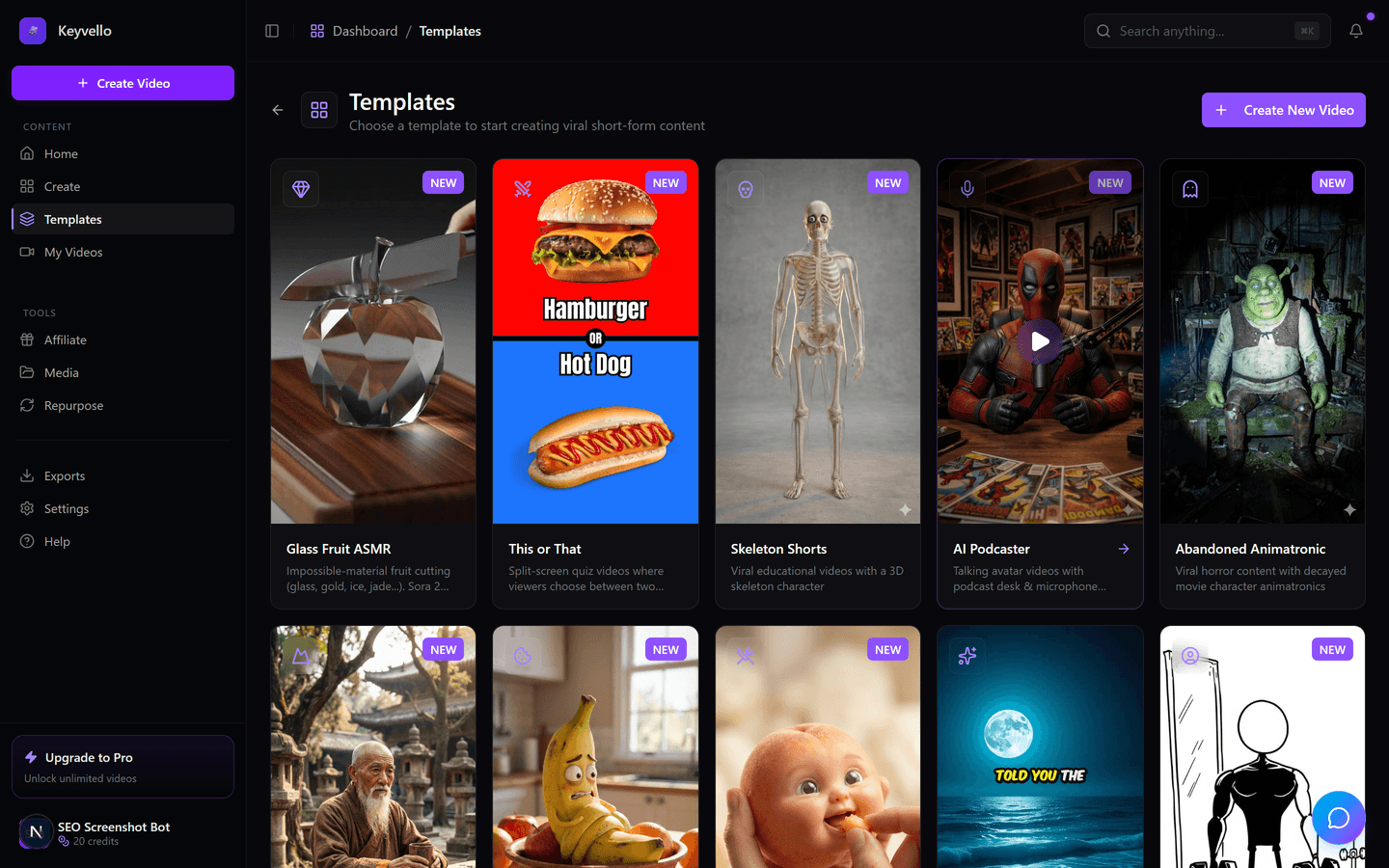
2. Pick a template
There are 11 templates built for faceless formats: AI Stories, Fake Texts, Stick Animation, Kids Stories, Split Screen, Viral Wisdom, and more. Each template controls the visual style, pacing and caption look so a beginner does not have to art-direct anything.
3. Generate and preview
Generation typically takes 2 to 5 minutes. You get a vertical 9:16 video with AI images, an ElevenLabs voiceover, and burned-in captions, all watchable in the browser. On the free tier you can watch the full result, regenerate scenes you do not like, and decide whether the quality is worth paying for before you spend a cent.
See a real output
This is an actual Keyvello-generated short, not a polished marketing render. Watch it on mobile, sound on, the way your audience will see it.
What you can actually do for free
Being blunt, because faceless creators batch content and need to know the real ceiling:
- Generate full videos from a prompt, topic or script across all 11 templates.
- Preview the complete result in your browser, with real audio and captions, at full quality. No watermark sits on the preview, so what you see is the genuine output.
- Regenerate scenes you do not like (one image costs 1 credit, a voice redo costs 3) until the credits run out.
- What you cannot do for free: download the finished MP4. Exporting the file requires a paid plan. We would rather say that plainly than pretend the free tier exports.
For a faceless workflow this means the free tier is a real audition: test whether the AI images, voice and pacing fit your niche before committing budget. It is not a content factory you can run for $0, and any tool that claims otherwise is usually hiding a watermark.
What a video really costs
Keyvello runs on credits, and the cost scales with length, captions and quality tier rather than a flat per-video fee. The average video our creators make is about 36 seconds and costs roughly 15 credits. Here is the base-quality breakdown:
| Video length | Base credits | + Captions |
|---|---|---|
| 30 seconds | 10 | 12 |
| 60 seconds | 18 | 20 |
| 90 seconds | 25 | 27 |
| 3 minutes | 40 | 42 |
| 5 minutes | 70 | 72 |
| 10 minutes | 120 | 122 |
Quality multipliers stack on top: base is 1x, pro is 1.5x, and ultra is 2.5x. So a 30-second base video is 10 credits, while the same video at ultra quality is 25. With 20 free signup credits you can generate and preview roughly two 30-second shorts before you decide to upgrade. That is deliberately enough to judge quality, not enough to build a channel for free.
Honest comparison with the main alternatives
Every tool below has a free entry point, but the fine print differs a lot. These facts were checked against each company's public pricing in 2026; where a tool's site does not clearly state a fact, the cell says "check site" rather than a guess.
| Tool | Free tier? | Watermark on free output? | Free downloads? | Cheapest paid plan | Best for |
|---|---|---|---|---|---|
| Keyvello | Yes (20 credits, no card) | No watermark on any plan | No — download needs a paid plan | $19/mo (Starter) | Faceless short-form across 11 templates |
| Revid.ai | Yes (welcome credits) | check site | No — exports need a paid plan | $39/mo (Hobby) | Remixing trending viral video formats |
| Pictory | 14-day trial | Yes (watermark on trial output) | No — watermark-free needs paid | ~$19/mo (Starter, annual) | Turning long blog posts/articles into video |
| InVideo AI | Yes (limited weekly credits) | Yes (watermark on free exports) | Watermarked only | ~$28/mo (Plus) | Stock-footage marketing & explainer videos |
| Fliki | Yes (5 min/mo) | Yes (watermark, 720p on free) | Watermarked, 720p only | ~$21/mo (Standard, annual) | Text-to-speech voiceovers & voice cloning |
The pattern worth noticing: most rivals do let you export for free, but only with a watermark and often at 720p. Keyvello flips that trade. We do not export for free at all, but the moment you pay, every video on every plan is clean and full quality with no logo to remove later.
When another tool is the better choice
No single tool wins everything, and pretending otherwise would waste your time. If you need a hyper-realistic talking-avatar presenter for corporate training or localized enterprise video, Synthesia or HeyGen do that far better than any faceless-shorts tool. If your main job is converting written articles and blog posts into stock-footage explainers, Pictory is purpose-built for that. If you mainly want polished marketing or product videos with a huge stock library and brand kits, InVideo fits better. And if your priority is text-to-speech and voice cloning more than visuals, Fliki leads there. Keyvello is the right pick specifically when your goal is faceless, narrative short-form for Shorts, TikTok and Reels, produced fast and in volume.
Proof it is not just a demo
Creators have generated more than 9,000 videos on Keyvello, including over 2,400 in the last 30 days, across a community of 6,000+ creators. That is real, recurring usage from people shipping content, not a screenshot reel.
Start free
You do not need a card to find out if AI video fits your channel. Create an account, get your 20 credits, generate a short on the template that matches your niche, and watch the full preview. If the quality earns it, the cheapest paid plan is $19/mo and removes the download lock with no watermark on anything you export.
Frequently Asked Questions
Is Keyvello actually free, or is it a trial that expires?
It is genuinely free to start, not a timed trial. New accounts get 20 credits with no credit card required, and those credits do not expire on a countdown. You use them to generate and preview real videos. The one paid step is downloading the finished MP4.
Does the free plan put a watermark on videos?
No. Keyvello does not put a watermark on any plan, including the free preview. What you see in the browser is the genuine, clean output. The free-tier limitation is that you cannot download the file until you are on a paid plan, not that the video is branded.
Can I download videos for free?
No. Generating and previewing is free, but downloading the finished MP4 requires a paid plan (Starter is $19/mo). We are upfront about this because the alternative most tools use is letting you export a watermarked, low-resolution file for free, which is not actually usable.
How many free videos can I make?
Roughly two 30-second videos. New accounts get 20 credits, and a base-quality 30-second video costs 10 credits (12 with captions). You can stretch that further with shorter clips or spend it on one longer video, and you can regenerate individual scenes cheaply (1 credit per image) while testing.
Do I need video editing skills to use it?
No. You describe the video in a sentence or paste a script, pick one of 11 templates, and the AI writes the narration, generates the images, adds an ElevenLabs voiceover, and burns in captions automatically. There is no timeline to learn before you get a result.
How long does it take to make a video?
Typically 2 to 5 minutes from prompt to finished preview, depending on length and quality tier. Images and voiceover are generated in parallel to keep it fast, so you are not waiting on a long render queue for a short clip.
Can I use the videos commercially on my own channel?
Yes. Videos you create and download on a paid plan are yours to publish on YouTube Shorts, TikTok, Instagram Reels or anywhere else. There is no watermark to strip and no per-video royalty.
Start Creating Unlock Your Creativity with Keyvello's AI Video Maker Free Videos
AI-generated unlock your creativity with keyvello's ai video maker free videos in minutes. Try it free.
Get Started Free