AI Video Generator on Mobile: What Actually Works From Your Phone in 2026
Can you really make AI videos from your phone in 2026? Honest breakdown of mobile-browser vs native apps, what works on phone vs desktop, and real costs.
Use Cases
TL;DR for the impatient
Yes, you can generate a full AI video from your phone in 2026 — but the experience depends on whether a tool ships a native app or runs in your mobile browser. Keyvello is browser-only: there is no Keyvello app in the App Store or Google Play. You open keyvello.com in Safari or Chrome on your phone, type a prompt, pick a template, and the video renders on our servers in roughly 2-5 minutes. Generating and previewing is free with 20 starter credits and no card. The honest catch: downloading the finished file requires a paid plan — the free tier is preview-only. If you want a tap-to-record, edit-on-screen native app instead, tools like Captions are built phone-first (more on that below).
How it runs on a phone, in three steps
Because Keyvello lives in the browser, the whole flow is thumb-friendly. There is nothing to install and nothing to update.
1. Describe the video
Open keyvello.com on your phone and type what you want — a topic, a script, or a rough idea. The prompt box is the same on mobile as on desktop, just stacked for a narrow screen.
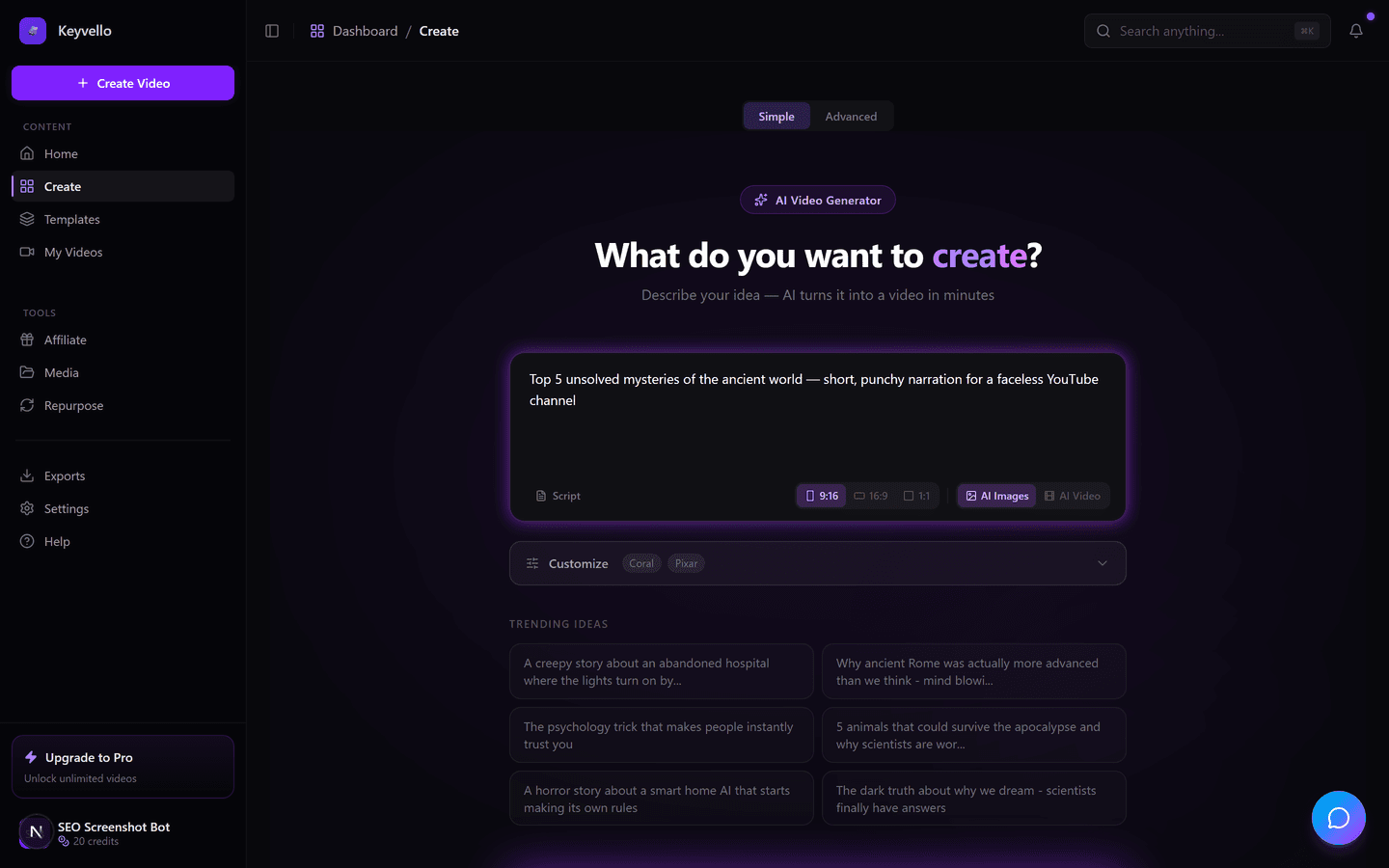
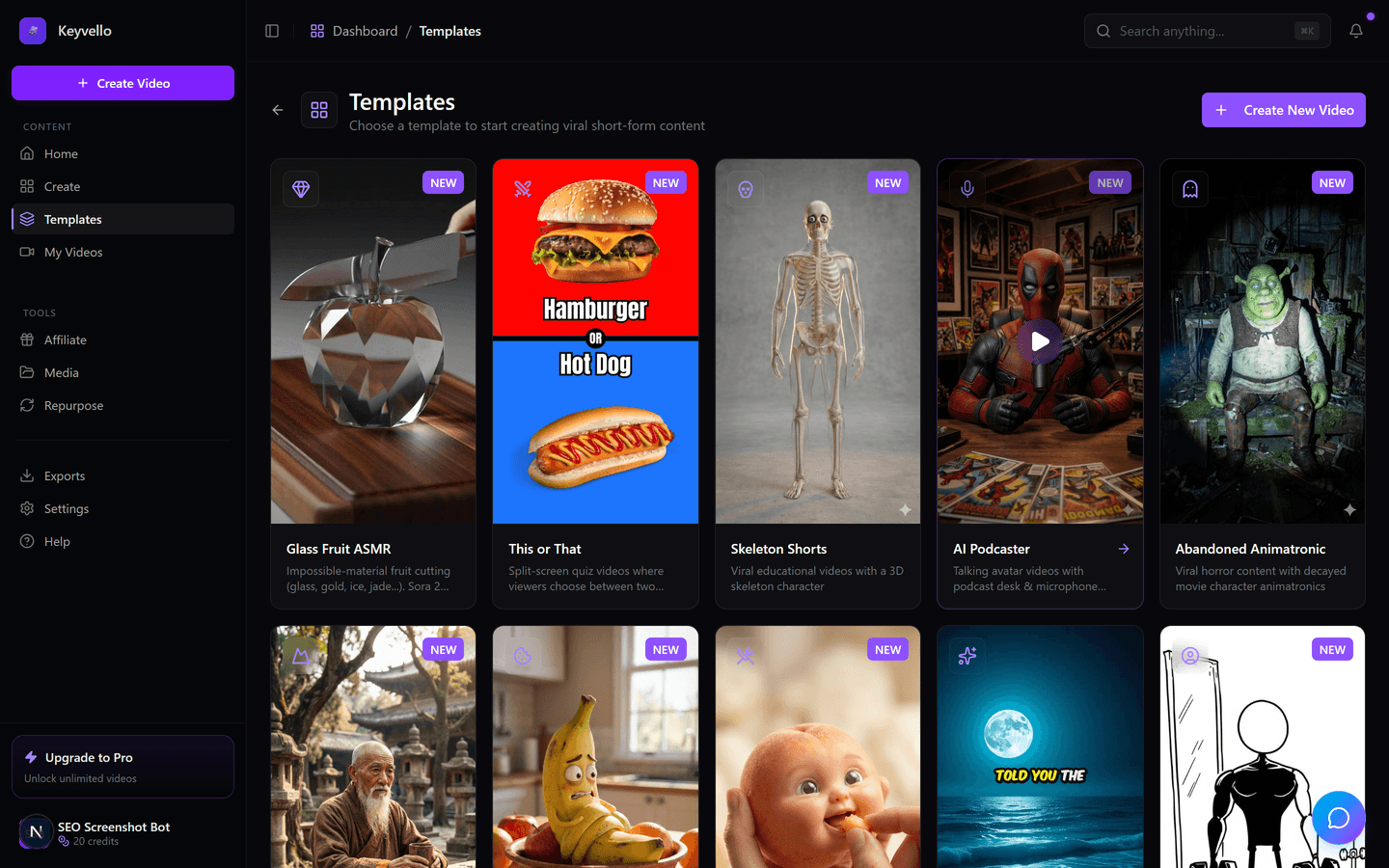
2. Pick a template
Choose from 11 templates — AI Stories, Fake Texts, Stick Animation, Kids Stories, Split Screen and more. Each one sets the visual style, pacing, and aspect ratio (vertical 9:16 by default, which is what you want for Shorts, Reels and TikTok).
3. Generate and wait ~2-5 minutes
Tap generate. The heavy lifting — script via GPT-4o, images, voice via ElevenLabs, and the FFmpeg composition — all happens server-side, so your phone is not doing the rendering. You can lock the screen, switch apps, or come back later; the job keeps running. When it is done you preview it in-browser.
See a real Keyvello output
Below is an actual video produced by the engine. Treat it as an honest sample of output quality, not a promise that your exact niche will look identical — your result depends on your prompt and the template you pick.
The real question: native app vs mobile browser
This is the thing nobody states plainly, so here it is. In 2026, AI video tools fall into two camps, and the right one for you depends on how you actually work.
If you want to film yourself and edit on the screen
You probably want a native app. Apps like Captions are built phone-first: you record, the app auto-cuts, adds captions, and you trim clips with your thumbs. That on-device editing loop is something a browser tab cannot match. Keyvello is not that — it does not edit your camera footage.
If you want faceless videos generated from a prompt
A mobile browser tool is genuinely fine, and arguably better. There is no app to download, no storage taken up, no forced updates, and the same account works on your phone and your laptop with nothing to sync. Keyvello sits squarely here: you are not filming or hand-editing, you are describing a video and letting the server build it. For that job, a tab does everything an app would.
What is genuinely worse on a phone
Being honest about the trade-offs: fine-grained timeline editing, regenerating individual scenes while comparing them side by side, and reading long captions are all more comfortable on a bigger screen. The generation is identical on mobile; the tweaking afterward is where a laptop pulls ahead. If you mostly accept the first render and post it, your phone is all you need.
A real cost data point (so you can budget on mobile)
Keyvello runs on credits, and the cost is the same whether you started on a phone or a desktop. The average video creators make is about 36 seconds and costs roughly 15 credits. Here is the actual base-quality pricing so there are no surprises:
- AI-image videos (the common, affordable kind): 30s = 10 credits, 60s = 18, 90s = 25, 3min = 40, 5min = 70, 10min = 120. Add captions for +2 credits.
- Quality multipliers: base is 1x, pro is 1.5x, ultra is 2.5x.
- Full AI video (moving AI footage, not still images) is far pricier: roughly 60 credits for 30s and 108 for 60s. Worth knowing before you tap it on a phone expecting image-video prices.
- Small fixes are cheap: regenerate one image for 1 credit, redo the voice for 3.
Your 20 free starter credits cover a short AI-image video so you can judge the output before paying anything.
How the mobile experience compares across tools
Researched live in May 2026. Verify current details on each vendor's site, since features shift fast.
| Tool | Native app? | What it's built for | Free output download? |
|---|---|---|---|
| Keyvello | No — mobile browser only | Faceless videos generated from a prompt | No — preview free, download needs a paid plan |
| Captions | Yes — iOS + Android (captions.ai/download) | Filming yourself + on-device editing & captions | Check site |
| InVideo AI | Yes — app + browser (Google Play) | Prompt-to-video; heavy edits best on desktop | Check site |
| Revid.ai | No — web browser only (revid.ai) | Faceless short-form, auto-posting | Check site |
When another tool is the better call
I would rather you pick the right tool than the wrong one. If your content is you talking to camera — vlogs, talking-head clips, reaction videos — get a native app like Captions; the record-and-edit loop on the phone beats anything browser-based. If you need a polished timeline editor with manual control over every clip, a dedicated mobile editor like CapCut is purpose-built for that. If auto-posting straight to your social accounts from one dashboard matters most, look hard at Revid.ai. Keyvello's lane is narrower and we are fine saying so: prompt-to-faceless-video, 11 styles, no install, no watermark on any plan.
The proof, plainly
Keyvello has generated 9,000+ videos for 6,000+ creators, with 2,400+ made in just the last 30 days — a meaningful share of those started or finished on a phone, because the browser flow works the same on mobile. No watermark is added on any plan, free or paid.
Try it free from your phone right now
Open keyvello.com on the device you are reading this on. New accounts get 20 free credits, no card required. Type a prompt, pick a template, and watch a real AI video render in a couple of minutes. Generate and preview for free; upgrade to a paid plan (Starter $19/mo, Plus $39/mo, Pro $99/mo) only when you are ready to download and post.
Frequently Asked Questions
Is there a Keyvello mobile app I can download?
No. Keyvello is intentionally browser-only in 2026 — there is no app in the App Store or Google Play. You use it by opening keyvello.com in Safari or Chrome on your phone. The upside is nothing to install or update, and the same account works on your phone and laptop with no syncing. If you specifically want a downloadable native app, Captions and InVideo both ship one.
Can I really generate a full AI video on my phone, or just edit one?
You can generate one start to finish. You type a prompt, pick a template, and tap generate — the script, images, voice and final composition all happen on our servers, not on your phone. It takes about 2-5 minutes, and you can lock your screen or switch apps while it runs.
What works better on desktop than on my phone?
Generation is identical on both. The difference is the tweaking afterward: fine timeline editing, regenerating individual scenes side by side, and reading long captions are all more comfortable on a bigger screen. If you usually accept the first render and post it, your phone is enough.
Is it actually free to use on mobile?
New accounts get 20 free credits with no card, which is enough to generate and preview a short AI-image video. The honest limit: downloading the finished file requires a paid plan — the free tier is preview-only. There is no watermark on any plan, free or paid.
How many credits does a typical mobile video cost?
The same as on desktop. A 30-second AI-image video is 10 credits, 60s is 18, 90s is 25 (add captions for +2). The average creator's video is about 36 seconds and around 15 credits. Note that full AI video — moving AI footage rather than still images — is much pricier, roughly 60 credits for 30 seconds.
If I start a video on my phone, can I finish it on my laptop?
Yes. Because it is browser-based and tied to your account rather than a device, you can start on your phone, then open keyvello.com on your laptop to review, regenerate scenes, or download. Nothing needs to sync because it all lives in your account.
Which tool should I use if I film myself instead of making faceless videos?
Start Creating AI Video Generator Mobile App 2026 - Create Effortlessly Videos
AI-generated ai video generator mobile app 2026 - create effortlessly videos in minutes. Try it free.
Get Started Free